Insights from Zee Palm's Team
We talk about products, app development, and next-generation apps.

Top 10 VS Code Extensions for Flutter Developers
You can enhance your development process by installing additional languages, debuggers, and tools through VS Code extensions. The robust extensibility strategy of VS Code enables extension authors to seamlessly integrate into the VS Code UI and add functionality using the same APIs that VS Code uses.
Extensions for Flutter developers:
Below are the top 10 VS Code extensions that are useful for Flutter developers.
1. Better Comments:

Between code blocks, the readable text called comments is used to provide information, cautions, inquiries, and to-do lists. Since they significantly reduce the amount of time it takes to understand a particular function, method, or piece of code, they are very helpful while working in a team or on a single project. With the Better Comment plugin, you may add comments with bold colors to highlight the information you want to convey.
2. CodeSnap:

Code Blocks are commented through text fields because text fields read code blocks as text rather than as code blocks, and text areas are frequently poorly structured and challenging to read. Distributing code blocks across social networks and team group chats that lack the code structure functionality becomes difficult as a result. However, with the introduction of the CodeSnap extension, code blocks can now be easily captured, saved, and shared as photos in addition to being shared as code blocks. This is particularly helpful for posting code snippets on websites that are focused on knowledge, like Stackoverflow, Boomfire, and AnswerHub.
3. Color Highlight:
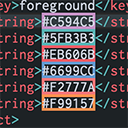
By surrounding each HEX value with the color it's intended to preview before running our code, the Color Highlight addon makes colors visible in the code editor. As a result, there is no longer a necessity or benefit to checking for a preview after launching the application.
4. Dart Data Class Generator:

Our daily life as software developers involves classes and models. Because of the cumbersome boilerplate code that must be written by creating classes. Thanks to the Dart Data Class Generator, creating classes with constructors, from Json, toJson, copyWith, fromMap, toMap, etc, based on provided class data can now be done quickly and easily.
5. Error Lens:

Making mistakes in the code is unavoidable and can lead to major problems or breakdowns in the creation of new code. Before running the code, the Error Lens addon can scan the entire code base for problems and highlight them. This feature shields the product from significant flaws.
6. Flutter Tree:

The Flutter framework is a tree of widgets since it is constructed on widgets, which in turn give rise to children's widgets and so forth. It might occasionally be difficult and time-consuming to write and recognize the widgets of the tree with its syntax; this is where the Flutter Tree comes in. By employing a more straightforward syntax, the Flutter Tree enables Flutter developers to build their custom widget tree.
7. Github Copilot:

Programming presents a variety of difficulties for developers, starting with logical reasoning, DRY coding, and closure syntax. While VSCode IntelliSense extensions might be helpful, their intelligence is frequently constrained and imprecise. With the introduction of the Github copilot, developers are, however, light years ahead of the curve when taking into account the features offered by this AI.
Utilizing the OpenAI Codex, Github developed GitHub Copilot, a cloud-based AI that analyzes the file context you are now working on and sends real-time code ideas right to your editor. This year's list of the most well-liked extensions among developers now includes it at the top.
8. Json to Dart Model:

When using external APIs, models are especially important in Flutter since they assist in organizing the response and transferring it to a more specialized output. It can be laborious and time-consuming to build a model from the JSON answer. The JSON to Dart Model extension, on the other hand, enables models to be created from JSON that has been copied to the clipboard and then uploaded directly to our Dart file with your customized settings.
9. Pubspec Assist:

The pubspec.yaml file is one of Flutter's most delicate files due to its stringent indentation and grammar, making it challenging to add or remove dependencies. When adding dependencies, however, Pubspec Assist prevents you from directly editing your pubspec.yaml file. You can add many dependencies simultaneously using the Pubspec Assist extension, which will save you time compared to adding them one at a time.
10. Flutter Widget Snippets:

The Flutter Widget Snippets are at the pinnacle of widget shortcuts with more than 600,000 downloads. Powerful, frequently used widget snippets employing custom keywords are provided by the Flutter Widget Snippets. This helps developers build applications more quickly by eliminating the need to create large widgets.
Conclusion:
Overall, these extensions may provide several useful functions and capabilities to aid in the use of VS Code to develop Flutter apps. Whether you're a new or seasoned Flutter developer, these extensions can help you increase your productivity and create better Flutter apps.
For custom software development, visit us at Zee Palm
For free premium front-end flutter kits, visit Flutter Coded Templates
Check out free Flutter Components, visit Flutter Components Library

Top 10 Chrome Extensions for Developers
One way to improve your browsing experience on Google Chrome is by adding Chrome extensions. These are small programs that can be easily installed and enhance the functionality of your browser. They can modify Chrome's functionality, add new features, or block adverts. Extensions can be downloaded through the Chrome Web Store and are written in JavaScript and HTML. Chrome extensions are a considerable way to boost your browser's capabilities and simplify your life as a developer.
Top Ten Chrome Extensions For Developers:
As a developer, you have access to a wide range of extensions. However, after careful consideration, we have identified the top ten extensions that are most suitable for your needs.
1. Web Developer
.jpeg)
Any developer should have the Web Developer plugin. It provides access to several tools for inspecting, debugging, and evaluating web pages. It allows you to see a page's HTML, CSS, and JavaScript as well as the network queries that the page makes. Other capabilities include the option to enable and disable JavaScript and CSS as well as imitate various screen sizes.
2. React Developer Tools
.jpeg)
The React Developer Tools extension is essential if you are creating React apps. By giving you a live view of the component tree, the state of your app, and the performance of your app, it helps you gain a thorough understanding of how your React app is functioning. It also provides a variety of additional capabilities, like the capacity to go through the code line by line and debug your project.
3. Postman
.jpeg)
An excellent tool for testing APIs is Postman. By using this extension you can examine the response data and send and receive requests. It has various functions such as the option to save queries and responses and the capacity to associate with others on API testing.
4. JSON Viewer
.jpeg)
The JSON Viewer extension is a simple but useful tool for viewing JSON data. It helps to format the data as well as search for specific information and browse it. It also has several other characteristics, such as exporting the data to a file and copying it to the clipboard, among others.
5. Wappalyzer
.jpeg)
Wappalyzer is a remarkable resource for figuring out which technologies are being used on a web page. It can provide information on the CMS being used, the programming languages being employed, and the integration of third-party services. This data may be useful for troubleshooting, market research and security audits.
6. ColorZilla
.jpeg)
ColorZilla is a wonderful tool for choosing colours from websites. It includes a variety of characteristics, including the capacity to select colours from a page's text, background, and foreground elements. Over and above that, it contains a colour history and a colour picker tool.
7. WhatFont
.jpeg)
WhatFont is a fantastic resource for figuring out which fonts are being used on a website. It can provide information about the font's name, family, and size. Other features include the opportunity to download the font file and the ability to preview the font on your computer.
8. Usersnap
.jpeg)
Usersnap is a phenomenal tool for taking and sharing screenshots of websites and comments on them. Any area of a page can be screenshotted, and the screenshots can also have annotations and comments added. After that, you can give your team or clients access to the screenshots and comments.
9. Session Buddy
.jpeg)
Session Buddy is a great tool for managing your tabs and bookmarks. It has several features that include the ability to search for tabs and preview tabs before opening them, among others.
10. Vimium

Vimium is an enormous Chrome extension for keyboard navigation. You can use just your keyboard to navigate through web pages. In addition to that, it has various characteristics such as the capability to scroll through pages and open links in new tabs.
Benefits of Using Chrome Extensions
There are many benefits to using Chrome extensions, including:
- Increased productivity: By adding new functions to your browser, such as a task manager, a to-do list, or a timer, Chrome extensions can increase your productivity. Distractions like advertisements or social media updates can also be blocked by them.
- Improved security: By eliminating malware, phishing scams, and other online hazards, Chrome extensions can help you increase your security. They can also safeguard your privacy and secure your passwords.
- Personalized browsing experience: The appearance and feel of your browser, the addition of new capabilities, or the banning of stuff that you don't want to see are all ways that Chrome extensions can help you customize your surfing experience.
Chrome Extensions' Uses:
Chrome extensions can be used for many different things, such as:
- Chrome extensions that include features like breakpoints, line numbers, and code highlighting can be used to debug programs.
- Chrome extensions can be used to test APIs by sending and receiving requests, as well as seeing the data returned by the APIs in response.
- Chrome extensions that offer functionality like HTML and CSS inspection, JavaScript debugging, and network request monitoring can be used to investigate online pages.
Conclusion:
A strong tool you may use to enhance your web browsing is a Chrome extension. You can be more productive, safe, and private with their assistance.
For custom software development, visit us at Zee Palm
For free premium front-end flutter kits, visit Flutter Coded Templates
Check out free Flutter Components, visit Flutter Components Library
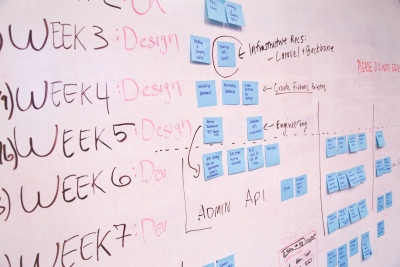
Top 10 Software Development Methodologies
Software development involves creating and maintaining software applications, frameworks, and other components. The process ranges from gathering requirements to deploying and testing the software.
A software development methodology is like a framework that directs the software development process. It provides a set of guidelines and best practices to ensure that the developed product meets quality standards and user requirements.
Components of software development methodology
The following are the core components of any software development methodology.
- Planning: This involves defining the project scope, identifying the requirements, creating a blueprint, and planning to ensure that the project is precisely defined and the team has a clear understanding of requirements.
- Design: Creating a detailed design for the software comprising architecture, UI, and data structures. This step is essential to guarantee that the software is well-structured and meets user requirements.
- Development: Creating a working product by coding, and actualising the idea.
- Testing: Testing software ensures that it meets the requirements and is free of defects. It guarantees the reliability of software.
- Deployment: This is the process of launching the software in the market, making it available to the users, and ensuring its reliability.
- Maintenance: Maintaining the software after it has been deployed includes fixing any bugs, adding new features, improving performance, etc.
A software development methodology ensures that the development process is smooth, helps to overcome hindrances, and avoids scope creep, budget overruns, and delays.
Top 10 Software Development Methodologies
There are numerous software methodologies to choose from each with its strengths and weaknesses. The best methodology for a project can be determined based on numerous factors such as the size and complexity of the project, team experience, budget, etc. The following are the most popular development practices.
1. Agile Development
The agile development methodology is based on an iterative and incremental development approach. Requirements and solutions are derived through the collective effort of independent, multi-functional teams.
Strengths:
- Flexible to change. Suitable for projects where the requirements are indistinct at the beginning.
- Promotes collaboration. Agile development requires close collaboration between the development team and the clients/end users. This can lead to high-quality finished products.
- It is incremental. Agile Development delivers working software in short increments, allowing early feedback from clients. Therefore, problems are identified and fixed at an early stage.
Shortcomings:
- Complexity. Requires more communication between developers and clients, and requires more flexibility and adaptability.
- Time-Consuming. It requires a lot of iterations.
2. Waterfall Development
This methodology follows a linear process, each phase should be completed before the next phase begins. It is a traditional development approach and is often contrasted with agile development.
Strength:
- Easy to plan. As each step has a clear starting and finishing mark.
- Efficiency. It can be efficient for projects with clear-cut requirements.
- Predictable. Waterfall development is predictable as the project schedule can be easily estimated.
Shortcomings:
- Not flexible to change. The changing requirements can demand the project be restarted.
- Less collaborative. As the requirements are gathered at the beginning, there is not much communication between the team and the clients during the development phase
- Time-Consuming. It can be relatively time-consuming as it requires better planning and documentation.
3. Lean Development
Lean development is based on the principles of Lean manufacturing. Lean manufacturing is a set of principles designed to reduce the inefficiency in the manufacturing process. Lean development applies this principle to the software development process, aiming to create high-quality software that meets the needs of users while minimizing waste and inefficiency.
Key Principles:
Lean development aims to eliminate wastes such as rework, defects, unnecessary activities, etc.
- Eliminate waste
- Build quality in
- Create knowledge
- Defer commitment
- Deliver fast
- Respect People
- Optimize the whole
These principles are designed to increase the overall efficiency of the development system.
Strengths:
- Empowers teams. Teams have the freedom to experiment and iterate on their models, empowering them to take ownership of their work.
- Increases agility. Teams often have to quickly respond to changes in requirements.
- Improves quality. Lean methodology prioritizes essential functions, lessening time wastage on unnecessary builds.
Shortcomings:
- Difficult decision-making. The need for customers to clearly define their requirements can complicate the decision-making process.
- Lack of documentation. Lean development emphasizes working software over comprehensive documentation.
- Inflexibility for structured projects or strict deadlines. Lean development involves a lot of experimentation and iteration, making it challenging to meet deadlines.
Although Lean is a relatively new development methodology, it has gained popularity because of its proficiency. It is designed to deliver the finished product in a timely and cost-effective manner.
4. Scrum Development:
Scrum is an agile development framework, where teams work on small and independent pieces of work (sprints). It is based on the idea of delivering working software at the end of each sprint.
Key Principles:
- Transparency among all stakeholders.
- Frequently reviewing the progress (reflection) resulting in increased efficiency.
- It offers adaptability and the possibility of reprioritizing tasks based on changing requirements.
Strengths:
- Promotes collaboration. Scrum promotes collaboration between team members and stakeholders.
- Quality driven. Scrum focuses on quality by incorporating testing and continuous improvement in the development process.
- Fast Delivery. Working on small, self-contained tasks contributes to efficient time management.
Shortcomings:
- Inefficient for small tasks. The team is required to go through the entire process for each task.
- Difficult to scale. As the size of the team increases communication can become difficult, managing the process can be complex, and the team may not be able to self organize
- Difficult to implement and manage. Scrum requires a high degree of discipline and visibility of the development process.
5. Extreme Programming (XP):
Extreme programming is another agile development framework that focuses on simplicity, testability, and communication. Teams work in short sprints and they regularly integrate and test their code. XP aims to produce higher-quality software. XP encourages collective code ownership and continuous refactoring.
Strengths:
- Simplicity. Emphasizes simplicity in the entire development process including code, design, and process itself.
- Testability. This helps to ensure that the software is working fine and makes it easy to find and fix bugs.
- Pair programming. XP teams often prefer pair programming, i.e., two people work on the same code. This helps to improve the quality of code.
Shortcomings:
- Difficult to implement. Requires a lot of discipline as the team needs to be able to work in short sprints, pair program, and regularly refactor their code.
- Costly. XP requires a high level of investment in training and tools. The team needs to be able to use agile development tools and have an understanding of XP principles.
- Difficult to scale. XP might not be suitable for large teams or complex projects as it requires close communication and collaboration.
Overall, XP is a very useful development framework and can help teams deliver high-quality software in a time-effective manner. But its shortcomings and limitations should be considered while choosing.
6. Rapid Application Development (RAD):
RAD is another agile development tool that is focused on speed and flexibility. It is based on prototyping and feedback rather than comprehensive planning. Developers perform in multiple iterations and updates rather than starting all over. It is preferable for projects with changing requirements.
Strengths:
- Speed and flexibility. Suitable for projects with tight deadlines and scope creep.
- User Involvement. RAD emphasizes user involvement throughout the development process, making sure that the finished product meets user requirements.
- Reusable components. RAD teams often use reusable blocks to build software, speeding up the process and making it cost-effective.
Shortcomings:
- This can lead to technical debt. While delivering software quickly, taking shortcuts in development can make it difficult to enhance the product in future
- Requires familiarity with agile tools. Teams need to be able to use agile development tools and have an understanding of RAD principles.
7. Dynamic System Development:
DSDM emphasizes the use of the dynamic systems theory model and an understanding of software systems’ behavior. This can help in identifying how the system will behave and identifying potential errors. It focuses on business needs. It involves modelling the system, analyzing the model, designing, implementing, and then testing the system.
Strengths:
- Help predict future behavior. This can be useful for planning and decision-making.
- Optimizing the system. DSDM can help identify and correct potential problems.
Shortcomings:
- Time-consuming. The teams need to have a deep understanding of dynamic systems theory.
- Difficult to validate. It can be difficult to validate the model against the real system as the real system can be too complex to be modelled accurately.
Dynamic systems development is a powerful tool that can be used to model and understand the behaviour of software systems. However, it can also be difficult and time-consuming to apply. The strengths and weaknesses of dynamic systems development should be keenly evaluated before using it to develop a particular software system.
8.Feature-Driven Development (FDD):
FDD is also an agile development method that emphasizes features. A feature is a small unit of functionality delivered to the client in a working state. It involves gathering requirements, creating a list of features, designing the features, and then developing and testing each feature independently.
Strengths:
- Incremental development. As software is developed in small manageable increments, the risk of potential failure is reduced.
- Documentation. FDD strongly focuses on documentation. This ensures that the software is maintainable.
Shortcomings:
- Time-consuming. As it requires a lot of planning and design.
- Difficult to change requirements. Changes in requirements can impact the feature list.
FDD is a powerful framework and can be very efficient if the requirements are described clearly however it can also be difficult to scale and time consuming.
9. Spiral Development:
Spiral development combines the elements of the waterfall and iterative methodologies, it is a risk-driven approach designed to minimize the chances of failure. It is diagrammatically represented by a spiral of many loops, the number of loops varies for each project. Each loop represents a phase of the software development process. It consists of planning, risk analysis, engineering, testing, and evaluation.
Strengths:
- Risk-driven. Spiral development is designed to identify and mitigate risks at an early stage.
- Incremental and flexible. It is an incremental approach, that allows flexibility in response to changing requirements.
- Improved quality. Multiple iterations result in improved quality and reliability.
Shortcomings:
- Time-consuming. As it requires a lot of planning and multiple evaluations, it can be very time-consuming.
- Costly. Spiral development can be very expensive as it requires significant investment in risk analysis and review.
- Difficult management. As the number of phases can be undetermined, time estimation can be very difficult.
Spiral development is an excellent framework, it can reduce the risk of failure. However, it can be time-consuming, expensive, and difficult to manage.
10. Kanban Methodology:
Kanban emphasizes visualizing the workflow and breaking it down into actionable pieces on a Kanban board. It is a pull-based methodology, it means the work is pulled into development when it's ready. Kanban involves visualizing the work, limiting work in progress, and continuous improvements.
Strengths:
- Better communication. Visualizing the workflow on a Kanban board helps to improve communication and collaboration among team members.
- Effective prioritization. Kanban techniques help employees focus on the most important tasks, resulting in high-quality products delivered promptly.
- Limiting work in progress. This ensures that the team is not overloaded and the deadlines are met.
Weaknesses:
- Less useful in dynamic environments. Kanban is suitable when the team knows what work needs to be done and can estimate timeframes for each task. However, in rapidly changing environments, it can be difficult to estimate the time required for each task.
- Difficult to scale. Kanban is suitable for smaller teams, as the team gets bigger, it becomes difficult to manage the Kanban board and creates a communication gap.
Kanban is a powerful software development methodology that can be a good fit for many teams and projects. However, it's important to consider its limitations before using it.
Conclusion:
Software development methodologies are more than just frameworks. They are blueprints for creating a successful project. By understanding the strengths and weaknesses of each approach, one can navigate the complex world of software development with confidence. This will help you to deliver products that meet user needs, uphold quality, and stand the test of time.
For custom software development, visit us at Zee Palm
For free premium front-end flutter kits, visit Flutter Coded Templates
Check out free Flutter Components, visit Flutter Components Library

What is Software Project Management and is it Even Necessary?
A project is a well-defined task that requires careful planning and management. When working on a project, it is important to consider the start and end dates, budget, and quality requirements. Software projects are just as important as any other type of project, and they require a systematic approach to management.
In this blog, we will discuss the importance of software project management and how it is necessary to manage a software project.
What is software project management?
Software project management is the process of planning, organizing, and managing the resources involved in the development of software. It is important for several reasons. Some of them are given below:
Time and budget management
Firstly, it helps to make sure that software projects are implemented and completed on time, within the given budget, and to the required quality and specifications. It is important for companies and businesses because it helps them to reduce their expenses and to meet their deadlines.
Improved communication and coordination
Secondly, it improves communication between team members, which can lead to better project results. This is important as it leads to making sure that everyone is working towards the same goal and that everyone is on the same page.
Risk management
Thirdly, it helps to identify and make sure that there are minimum risks so that projects are less likely to fail. This is essential because it helps to protect businesses from financial losses and any reputational damage and harm.
Ensuring these things help a lot in managing the project, and having fast results and accurate outcomes. But if there is no management. The project may lead to problems with difficulty in communication and cooperation between team members and stakeholders, chances for the project to not finishing in time and cost-related problems.
The 3 P’s of Software Project Management
Software Project management has three building blocks, the 3 p's
Product
Software is the product here. The project manager must have an understanding of the product requirements and specifications.
People
The project manager, team members, and the stakeholders are people. Project managers must know how to communicate and deal with these people and know how to get them to do work efficiently.
Process
How software is being developed in the process. The project manager must choose how less expenses and time are required with maintaining the requirements and quality of the software
Managing the three of them effectively and mindfully increase the success of the project in less time managing budget and risk skillfully.
Poor software project management:
The mistakes that lead to poor outcomes in software management that can ultimately lead to unsuccessful results are as under
Lack of planning
when there are poorly planned projects. They are more likely to be failed. If there is no clear understanding of the software and time constraints the project will be a failure and time-consuming which can be done if there were proper planning.
Unrealistic Deadlines
When doing such things as managing a software project. The deadlines should be realistic and well-planned so that the planner can direct the steps clearly and explain what milestones are to be achieved.
Increased cost
Not having a planned budget and a target can increase the expenses and resources used in the project. The cost should be determined in such a way that it is utilized effectively and not wasted on unnecessary things.
Dissatisfied Customers
The most major setback for any service or software is customer dissatisfaction. Delay in submission or error in the software can disrupt the end goal and bring about a bad image. Proper feedback and involvement from the customer are important and can only be achieved if there is proper project management.
Importance Decoded In Real Time:
The importance of software project management can also be found in real life. Companies and businesses all around the world use this and work efficiently so there are minimum chances of risks and failure. Some of the big companies that use this are:
Microsoft:
Microsoft uses different software project management tools and techniques. Microsoft creates detailed plans for their software breaking them into small tasks considering the required time, cost and requirement specified. Also considering the risk that can occur during the process. This helps to ensure that projects are less likely to fail. Microsoft also considers the changes that may be needed in future and have a good team and working environment making sure everyone is on the same page and working properly.
Google:
Google uses the agile methodology for a lot of its software projects. It is a flexible methodology which works successfully in changing environments. It is very easy to adapt and enforce. Google also uses Kanban and Scrum for many of its software projects to manage the framework and visual system of the software.
Netflix, Apple, Amazon and many other famous companies use software project management techniques and methods. Not only in big companies but also in some projects applying this helps to provide good outcomes and results to the customers and stakeholders.
Conclusion
Software Project Management is an important skill which ensures that a project is completed on a given time and with less budget and is according to the customer requirement and satisfaction. If there is any change needed in it a project scope manager can ensure that the required measures are taken to make the project up-to-date and errorless.
For custom software development, visit us at Zee Palm
For free premium front-end flutter kits, visit Flutter Coded Templates
Check out free Flutter Components, visit Flutter Components Library

Important aspects to consider in mobile app development
Mobile apps are part of the digital revolution. However, not all apps are created equal. Some apps possess the ability to be more successful than others. The primary reason is that successful apps have certain essential features that make them intuitive, user-friendly, and interactive. An app is successful when the user tends to use it often. In this blog post, we'll look at some essential features that every mobile app should have.
Intuitive Navigation
One of the prominent features of a successful mobile app is intuitive navigation. It is important to provide users with a sense of confidence and understanding in their actions. Users should be able to navigate through the app easily without getting lost or confused. The navigation menu should be easily accessible, understandable, and consistent throughout the app.
Solution
To achieve intuitive navigation, use a clear and simple menu. This can be a hamburger menu, a tab bar, or a bottom navigation bar. Whatever option you choose, make sure that the menu is consistent throughout the app and easy to access from anywhere within the app.
Design Clarity
The design of your app is crucial to its success. The layout should be clean and uncluttered, with a consistent colour scheme and typography.
Solution
When designing your app, consider the principles of user interface (UI) and user experience (UX) design. Make sure that the app is visually appealing and the interface is intuitive. A simple and clear design will also make it easier for you to make updates and improvements in the future.
Fast Loading Time
In today's fast-paced world, users expect apps to load quickly. If an app takes too long to load, users are likely to abandon it and look for an alternative. Therefore, it is essential to optimize your app for speed and ensure that it loads quickly.
Solution
There are several ways to achieve faster loading times. One way is to optimize images and other media files. You can also use lazy loading to defer the loading of non-critical content until the user needs it. Another option is to use a content delivery network (CDN) to speed up content delivery.
Offline Accessibility
Offline accessibility is becoming increasingly important in mobile apps. Users don't always have access to the internet, and they still want to be able to use your app even when they are offline. Therefore, it is essential to design your app to work offline as well.
Solution
One way to achieve offline accessibility is by caching data on the user's device. This means that users can still access some parts of the app even when they are offline. You can also use local storage to store user data and settings so that they can still access their information even when they are offline.
Personalization
Personalization is becoming increasingly important in mobile apps. Users like to feel that the app is tailored to their needs and preferences. It helps users feel more engaged with the app and can lead to increased user retention and loyalty.
Solution
There are several ways to offer personalization options in your app. Making the user interface customizable, offering options to adjust app settings, and delivering personalized content based on user preferences are all viable choices.
These five essential features are the backbone of a successful mobile app. By prioritizing these features during the development process, you can create an app that not only meets user's needs but also exceeds their expectations. A well-designed app that loads quickly, works offline, and offers personalization options will not only improve user engagement but also increase user loyalty and retention.
For custom software development, visit us at Zee Palm
For free premium front-end flutter kits, visit Flutter Coded Templates
Check out free Flutter Components, visit Flutter Components Library

Ways to improve mobile app security
Mobile apps are becoming an increasingly popular medium for personal and business use, and with this popularity comes an increased risk of security breaches. As a mobile app developer, it's crucial to ensure that your apps are secure to protect the sensitive data of your users. In this blog post, we'll discuss some ways we use at Zee Palm to improve our mobile app’s security and protect them against potential threats.
Encryption:
Encryption is a powerful tool for protecting sensitive data and is a basic security measure that should be implemented in all mobile apps. Encrypting data both in transit and at rest can help protect against data breaches and unauthorized access. It is used to protect sensitive data such as user credentials, financial transactions, and other personal information. Encrypting this data becomes unreadable to anyone who doesn't have the decryption key, making it much harder for attackers to steal the data. Mobile apps often communicate with servers or other devices, and encryption can be used to ensure that this communication is secure. By encrypting the data being transmitted, it becomes much harder for attackers to intercept and read the information. Encryption can be used to protect app code and other critical data from tampering. If an attacker tries to modify the code or data, the encryption makes it much more difficult to do so without the proper decryption key.
Use secure network connections:
When transmitting data, it's important to use secure network connections such as HTTPS or SSL. These protocols encrypt the data being transmitted, making it more difficult for hackers to intercept and steal sensitive information. Secure network connections can also provide authentication mechanisms that ensure that the app is communicating with the intended server. This helps to prevent attackers from intercepting the communication and redirecting the app to a malicious server. Using a secure network connection can help prevent man-in-the-middle (MITM) attacks, where an attacker intercepts the communication between the app and the server. With a secure network connection, the data is encrypted and authenticated, making it much more difficult for attackers to conduct a MITM attack. Many industries have regulations that require secure network connections for transmitting sensitive data. For example, healthcare apps must comply with HIPAA regulations, which require the use of secure network connections to protect patient data.
Implement two-factor authentication:
Two-factor authentication is a security measure that requires the user to provide two forms of identification before accessing an app. This can include a password, a fingerprint scan or a one-time code sent to the user's phone. Credential stuffing is a type of attack where an attacker tries to log in to an account using a list of usernames and passwords obtained from a data breach. 2FA can help prevent these attacks because the attacker would also need access to the user's second factor of authentication. 2FA can also help to protect against account takeover, where an attacker gains access to a user's account and uses it for malicious purposes. Using 2FA is an important security measure that can help enhance the security of mobile applications. It provides stronger authentication, protection against credential stuffing attacks, compliance with regulations, increased security awareness, and protection against account takeover.
Keep software up to date:
Keeping software up to date is an important aspect of securing mobile applications. Here are some ways that keeping software up to date can help to secure mobile applications:
1. Patching vulnerabilities: Software updates often include security patches that address known vulnerabilities in the software. By keeping the software up to date, mobile app developers can ensure that the latest security patches are installed, reducing the risk of the app being compromised by attackers.
2. Improved security features: Software updates may also include new security features that can help enhance the security of the app. For example, a new update may include stronger encryption algorithms, improved authentication mechanisms, and other security enhancements.
3. Protection against known threats: Attackers often target known vulnerabilities in software. Keeping the software up to date can help to protect against these threats. If a vulnerability is discovered and a patch is released, attackers will only be able to target apps that have not yet been updated with the patch.
4. Compatibility: Keeping software up to date can also help to ensure compatibility with other software and devices. In some cases, outdated software may not work properly with newer devices or operating systems, which can create security risks.
Conduct regular security testing:
Conducting regular security testing is an important aspect of securing mobile applications. Here are some ways that conducting regular security testing can help to secure mobile applications:
1. Identifying vulnerabilities: Security testing can help identify vulnerabilities in the app that could be exploited by attackers. By identifying these vulnerabilities, mobile app developers can take steps to patch them and reduce the risk of the app being compromised.
2. Testing against real-world attacks: Security testing can simulate real-world attacks and help to identify how the app would perform under different attack scenarios. This can help to identify weaknesses in the app's security defences and enable developers to make improvements.
3. Continuous improvement: Regular security testing can help to identify new vulnerabilities as they emerge, enabling developers to make ongoing improvements to the app's security defences.
Use of security tools:
Security tools can help make mobile apps secure by identifying and addressing potential security vulnerabilities in the code. Security tools can monitor the app in real-time and detect suspicious activity, such as attempts to exploit vulnerabilities, brute-force attacks, and other types of attacks. This can help to identify security threats before they can cause significant damage. One of the tools we use at Zee Palm is SonarQube. It is an open-source platform for continuous inspection of code quality. It's used to analyze the source code of different programming languages and identify issues such as bugs, vulnerabilities, and code smells. It can be integrated with development tools like IDEs, build tools, and continuous integration systems to perform automatic code analysis during development.
By adopting these security strategies, mobile app developers can significantly lower the threat of security breaches and safeguard sensitive user data. At Zee Palm, we appreciate the significance of mobile app security and collaborate with our clients to ensure their apps are protected against potential security risks. It is crucial to remember to encrypt your data, establish secure network connections, implement two-factor authentication, maintain software up-to-date, and conduct regular security testing to secure your mobile app.
For custom software development, visit us at Zee Palm
For free premium front-end flutter kits, visit Flutter Coded Templates
Check out free Flutter Components, visit Flutter Components Library

How to optimize mobile app performance
Optimizing mobile app performance is critical for delivering a seamless user experience and retaining users. In today's highly competitive app market, users have high expectations for app performance and will quickly abandon an app if it does not meet those expectations. At Zee Palm, we understand the importance of mobile app performance and have put together some tips to help you deliver a fast, responsive, and stable app.
Identify Performance Bottlenecks
The first step in optimizing your app's performance is to identify where the bottlenecks are. This can be done by conducting performance testing on different devices and configurations, using tools such as the Android Profiler or Xcode Instruments. These tools allow you to identify performance issues such as slow screen transitions, slow UI refresh rates, slow network calls, and more.
Minimize App Size
A large app size can have a significant impact on performance, especially on older or low-end devices. To minimize your app's size, you can reduce the size of image and video assets, minimize the number of libraries and frameworks used in your app, and reduce the size of your app's codebase.
Use Compression Techniques
Compression is a powerful tool for reducing the size of your app and improving performance. Some popular compression techniques include gzip compression, image compression, and resource packing. These techniques can significantly reduce the size of your app, thereby improving its performance.
Optimize Network Calls
Mobile apps often rely on network calls to retrieve data from servers. These calls can be slow, particularly when there is limited network connectivity. To optimize network calls, you can use caching, compression, and pre-fetching techniques to reduce the number of calls made to the server and improve the speed of data retrieval.
Minimize Battery Usage
Mobile apps can consume a significant amount of battery power, which can negatively impact performance. To minimize battery usage, you can optimize your app's battery usage by reducing the frequency of network calls, reducing the frequency of location updates, and reducing the frequency of background processing.
Use High-Performance Libraries and Frameworks
Using high-performance libraries and frameworks can significantly improve the performance of your app. Some popular libraries and frameworks for optimizing mobile app performance include React Native, Flutter, and Xamarin. These libraries and frameworks are designed specifically for mobile app development and can help you create fast, responsive, and stable apps.
Test and Monitor Performance
Testing and monitoring the performance of your app is essential for identifying performance issues and addressing them. You can use tools such as the Android Profiler or Xcode Instruments to monitor performance, and you can use automated testing tools to test the performance of your app across different devices and configurations. This will help you catch performance issues early so that you can address them before they become a major problems.
In conclusion, optimizing mobile app performance is a multi-faceted process that requires a systematic approach. By following the best practices outlined in this guide, you can deliver a fast, responsive, and stable app that meets the high expectations of your users. At Zee Palm, we recognize the significance of mobile app performance and our team of experts are committed to assisting you in creating a seamless app.
For custom software development, visit us at Zee Palm
For free premium front-end flutter kits, visit Flutter Coded Templates
Check out free Flutter Components, visit Flutter Components Library

Best practices for designing mobile user interfaces
Designing a mobile user interface (UI) is a crucial step in the mobile app development process. At Zee Palm, we understand the importance of creating an intuitive, easy-to-navigate, and visually pleasing interface. In this blog post, we'll share some of the best practices we follow at Zee Palm for designing mobile UIs that will help you create an app that's both functional and visually appealing.
Keep it simple
A minimalist approach is often best when it comes to mobile UI design. By avoiding clutter, you can make it easier for users to find what they're looking for and navigate through the app. This can be achieved by:
- Minimizing the number of elements on the screen: Avoid cluttering the screen with too many buttons, links, or other elements. Instead, focus on the essential information and actions and make them prominent.
- Using whitespace effectively: Whitespace, also known as negative space, is the area around and between elements on the screen. Using whitespace effectively can help to create a sense of balance and hierarchy in the UI, making it easier to scan and understand.
- Using simple and clear typography: Simple and clear typography can help to make the UI more legible and easier to understand. Use font size, weight, and colour to create a hierarchy and guide users through the UI.
Make it interactive
Make your design interactive by adding gestures. Gestures are actions performed with one or more fingers on the touch screen of a mobile device. They are a natural way to interact with mobile devices. Incorporate gestures into your UI design to make it more intuitive for users. These actions can be used to perform various functions within the app, such as navigating between pages, opening and closing menus, and selecting items. There are several widely used common gestures in mobile UI design:
- Swipe: A swipe gesture allows users to move between pages or sections within an app by sliding their fingers horizontally or vertically across the screen. This gesture is usually used for pagination and browsing through content.
- Tap: A tap gesture allows users to select items or activate buttons by tapping on the screen with their fingers. This gesture is commonly used for selecting options, activating buttons and links, and opening and closing menus.
- Pinch and spread: A pinch and spread gesture allows users to zoom in and out of images or maps by pinching or spreading their fingers on the screen. This gesture is commonly used for manipulating images and maps.
- Long press: A long press gesture allows users to access additional options or information by pressing and holding their finger on the screen. This gesture is usually used for displaying context menus and additional options.
Consider the device's form factor
Mobile devices come in a variety of shapes and sizes, so it's important to design a UI that works well on different devices. This includes taking into account things like screen size, resolution, and the location of buttons and other elements. Moreover, on a small screen, not all information can be displayed at once. Prioritize the most important information and make it easy for users to access it.
Use consistent design patterns
Design patterns are pre-established solutions to common design problems. These patterns can be applied to various elements of the UI, such as navigation, buttons, and forms. Examples of common design patterns include:
- Navigation patterns: Navigation patterns are used to guide users through the app and provide access to different sections or pages. Common navigation patterns include tabs, hamburger menus, and bottom navigation bars.
- Input patterns: Input patterns are used for collecting information from users, such as text input, checkboxes, and radio buttons.
- Feedback patterns: Feedback patterns are used to provide visual and textual feedback to users, such as progress bars, toasts, and snack bars.
Consistency is key when it comes to mobile UI design. Using consistent design patterns throughout the app, such as a consistent colour scheme, typography, and iconography can help users understand how to use the app and make it easier for them to navigate.
Test with real users
The best way to ensure that your mobile UI is effective is to test it with real users. This will give you valuable feedback on how the app is working and help you identify any areas that need improvement.
By following these best practices for designing mobile UIs, you'll be able to create an app that's both functional and visually pleasing to users. At Zee Palm, we understand the importance of user experience and strive to create designs that meet the needs of our clients and their users. Remember to keep it simple, use familiar elements, consider the device's form factor, use consistent design patterns, and test with real users to get the best results.
For custom software development, visit us at Zee Palm
For free premium front-end flutter kits, visit Flutter Coded Templates
Check out free Flutter Components, visit Flutter Components Library
10 Startup ideas to consider in 2023
1. Social media platform for connecting local farmer and consumers
A digital platform that allows small farmers to promote and sell their products directly to consumers in their area. The platform would allow farmers to create profiles, share photos and videos of their products and farming practices, and list their products for sale. Consumers would be able to browse and purchase products from multiple farmers in their area, and potentially schedule farm tours or participate in farm-to-table events.
Such a platform would provide a valuable marketing and sales channel for small farmers, who often struggle to reach consumers due to limited resources and exposure. It could also provide an alternative to traditional retail channels, such as supermarkets, for consumers who are looking for fresh, locally-grown produce and other farm products.
To differentiate itself from competitors, this social media platform could focus on building a strong community of farmers and consumers, offering a wide range of products, and promoting sustainability and support for small businesses. The platform could monetize through transaction fees, advertising, or premium features for farmers.
2. Subscription-based meal delivery service
With more people working from home and looking for convenient meal options, a subscription-based meal delivery service that offers healthy, customizable meals could be a hit. This service could source ingredients from local farms and focus on sustainability to differentiate itself from competitors.
The service typically operates by offering a selection of dishes that change on a weekly or monthly basis. Customers can choose to receive a certain number of meals per week or month, and the service will deliver the meals to their doorstep, often in insulated packaging to keep them fresh. Some subscription-based meal delivery services also offer the option for customers to pause or cancel their subscriptions at any time.
Subscription-based meal delivery services can be a convenient option for busy individuals who don't have the time or inclination to plan and prepare their own meals. They can also be a good choice for people who are trying to eat a healthier diet but don't have the time or resources to shop for and cook fresh ingredients.
To differentiate themselves from competitors, subscription-based meal delivery services may focus on offering a wide range of dietary options, such as vegetarian, vegan, gluten-free, or paleo. They may also source ingredients from local farms or use sustainable packaging to appeal to environmentally conscious consumers.
3. Personalized online marketplace for secondhand clothing
Personalized online marketplace for secondhand clothing is a digital platform that allows users to buy and sell gently used clothing and accessories. The platform would offer a range of clothing and accessories for men, women, and children, including designer and high-end brands.
To differentiate itself from other secondhand clothing marketplaces, this platform could focus on offering a high-touch, concierge-like experience for its users. This could include personalized product recommendations based on the user's style and preferences, as well as expert styling and curation services. The platform could also offer features such as in-person consultations with stylists, home pick-up and delivery for items being sold, and in-person fittings for items being purchased.
To attract and retain users, this platform could also focus on building a strong community of fashion-conscious consumers and sellers. It could offer resources such as style guides, trend reports, and fashion events to engage its audience and foster a sense of community.
This platform could monetize through transaction fees, advertising, and premium features for sellers, such as enhanced product listings or access to styling services.
4. Online marketplace for handmade and artisanal products
There is a growing demand for unique, handmade, and artisanal products. An online marketplace that connects artisans and craftspeople with consumers could be successful by offering a curated selection of high-quality products and supporting the growth of small businesses.
To differentiate itself from other online marketplaces, this platform could focus on offering a personal touch and building a strong community of artisans and consumers. This could include features such as personalized product recommendations, the ability for consumers to connect with artisans directly, and resources for artisans to promote and grow their businesses.
To attract and retain users, this platform could focus on offering a high-quality selection of handmade products and supporting the growth of small businesses. It could also offer resources such as tutorials, workshops, and events to engage its audience and foster a sense of community.
This platform could monetize through transaction fees, advertising, and premium features for artisans, such as enhanced product listings or access to business resources.
5. Subscription-based pet care service
A subscription-based pet care service is a company that offers a range of services to help pet owners care for their pets, including dog walking, pet sitting, and other services. Customers can choose from a variety of subscription plans, such as daily, weekly, or monthly, and customize their orders based on their needs.
The service typically operates by offering a team of trained professionals who can provide care for pets in the customer's home or at the service's facility. Services may include dog walking, feeding, and administering medications, as well as providing socialization and exercise. Some subscription-based pet care services may also offer additional services, such as grooming or training.
Subscription-based pet care services can be a convenient option for pet owners who are busy or unable to provide the necessary care for their pets due to work, travel, or other commitments. They can also be a good choice for people who want to ensure that their pets receive high-quality care while they are away.
To differentiate themselves from competitors, subscription-based pet care services may focus on offering a wide range of services, such as overnight care, specialized care for seniors or pets with special needs, and customizable care plans. They may also focus on offering a high level of customer service and reliability, such as through online booking and tracking, and regular communication with pet owners. The service could monetize through subscription fees and additional services.
6. Uber for Parking
Uber for Parking is a startup concept that offers an app-based platform for reserving and paying for parking spots in urban areas. The service would allow users to search for and reserve parking spots in advance, potentially at a discounted rate, and pay for their spot through the app. The service could also offer valet parking options, where a professional driver would park the user's car for them.
This startup could differentiate itself from competitors by offering a wide range of parking options, such as garages, lots, and street parking, and by using data to optimize pricing and availability. The service could also offer features such as real-time availability updates and the ability to extend or cancel reservations.
Uber for Parking could potentially expand to other transportation services, such as car rentals or car-sharing. This could allow the startup to offer a one-stop-shop for all of a user's transportation needs, making it a convenient and appealing option.
This startup could monetize through transaction fees, advertising, and additional services, such as valet parking or car-sharing.
7. Tipping platform for content Creators
This startup would be a platform that allows creators, such as artists, musicians, and influencers, to easily manage and accept tips from their followers. The platform would allow creators to create a customizable landing page where they can share links to their various tip options, such as PayPal, Venmo, and Patreon.
It could differentiate itself from competitors by offering a range of features to help creators manage and grow their tipping income. This could include analytics tools to track tip performance, resources to help creators optimize their tip page, and the ability to create custom tip tiers and rewards for supporters.
To attract and retain creators, you could focus on offering a user-friendly interface and a wide range of payment options. It could also offer resources such as tips and best practices for maximizing tip income, and build a strong community of creators and supporters.
This startup could monetize through transaction fees and premium features for creators, such as enhanced analytics tools and custom branding options.
8. Air BnB for coworking spaces
Air BnB for coworking is a startup concept that offers a platform for booking coworking spaces on a short-term basis. Similar to AirBnB, which allows users to book short-term rentals of homes and apartments, this platform would allow users to book coworking spaces for a few hours, a day, or longer.
This startup could differentiate itself from competitors by offering a wide range of coworking spaces, including traditional coworking spaces, home offices, and other unique spaces. It could also offer features such as online booking and payment, real-time availability updates, and reviews from previous users.
To attract and retain users, Air BnB for coworking could focus on offering a convenient and flexible booking experience, as well as a wide range of spaces to choose from. It could also offer resources such as training, networking events, and workshops to help users build their skills and grow their businesses.
This startup could monetize through transaction fees and additional services, such as premium listings or additional amenities.
9. Move and Store
This startup would offer a platform for customers to rent storage spaces on a monthly subscription basis, as well as a range of moving and storage services. Customers could choose from a variety of storage options, such as traditional self-storage units or more flexible, on-demand storage options. The startup would also offer services such as packing, loading, and transportation, as well as storage insurance and other protection options.
Move and Store could differentiate itself from competitors by offering a one-stop-shop for moving and storage needs, as well as a convenient and flexible booking experience. It could also offer features such as online booking and payment, real-time availability updates, and reviews from previous customers.
To attract and retain customers, Move and Store could focus on offering a wide range of storage options and services, as well as competitive pricing and high-quality customer service. It could also offer resources such as moving guides and tips, as well as a customer loyalty program.
This startup could monetize through subscription fees for storage, as well as fees for moving and storage services. It could also offer additional services and protection options for an additional fee.
10. Social App to connect fitness trainers with clients
A social app to connect fitness trainers with clients is a digital platform that allows fitness trainers to promote their services and connect with potential clients. The app would allow trainers to create profiles, share their expertise and experience, and list their services and availability. Clients would be able to browse and book trainers based on their location, specialties, and availability.
This social app could differentiate itself from competitors by offering a wide range of trainers and services, as well as convenient booking and payment options. It could also offer features such as real-time availability updates, reviews from previous clients, and the ability to connect with trainers directly.
To attract and retain trainers and clients, this social app could focus on building a strong community of fitness professionals and enthusiasts. It could offer resources such as training guides, workout plans, and expert advice to engage its audience and foster a sense of community.
This app could monetize through transaction fees, advertising, and premium features for trainers, such as enhanced profiles or access to marketing tools.
For custom software development, visit us at Zee Palm
For free premium front-end flutter kits, visit Flutter Coded Templates
Check out free Flutter Components, visit Flutter Components Library

How to choose the best backend technology?
As a developer or business owner, you know that choosing the right backend technology can have a huge impact on your project's long-term success. Not only can the right backend help you save costs, but it can also make it easier to scale and maintain your application over time.
In this post, we'll explore five popular backend options and compare their average cost per thousand users, ease of scaling, and development cost range. This will help you make an informed decision about which backend is the best fit for your project.
1. Serverless architectures
Serverless architectures, such as those provided by Amazon Web Services (AWS) Lambda or Google Cloud Functions, are a popular choice for backend development. These platforms allow you to run your code in response to specific events, such as a user uploading a file or a mobile app sending a notification or even an HTTP Request. This can be especially useful for web APIs, which typically receive a large number of requests that are difficult to predict.
One of the main benefits of using a serverless architecture for your web API is that you only pay for the resources you use. This means that you don't have to worry about maintaining idle servers or paying for resources that aren't being used.
In addition to cost savings, serverless architectures can also make it easier to scale your web API. If you receive a sudden influx of traffic, your serverless provider can automatically allocate additional resources to meet the demand. This ensures that your API stays responsive, even under heavy load.
Overall, serverless architectures can be a cost-effective and scalable solution for building and deploying web APIs. However, it's important to carefully consider the trade-offs, as serverless architectures can be more complex to debug and may not be the best fit for every project.
Average cost per thousand users: $0.20-$0.50
Ease of scaling: High
Development cost range: Low-medium
2. Containers
Containers, such as Docker, allow you to package your code and dependencies into a lightweight, portable unit that can run on any infrastructure. This makes it easy to deploy and run your application on any infrastructure, including on-premises servers, cloud platforms, and even local development environments.
One of the main benefits of using Docker for your web API is that it allows you to isolate your application from the underlying infrastructure. This makes it easier to deploy and run your API in a consistent environment, regardless of where it is deployed.
In addition to ease of deployment, Docker can also make it easier to scale your web API. You can use a container orchestration platform, such as Kubernetes, to automate the deployment and management of multiple Docker containers. This allows you to scale your API horizontally by adding more containers as needed.
Overall, Docker can be a flexible and scalable solution for building and deploying web APIs. However, it's important to carefully consider the trade-offs, as managing Docker containers can be more complex than using a fully managed solution.
Average cost per thousand users: $0.10-$0.30
Ease of scaling: High
Development cost range: Low-medium
3. Virtual machines
Virtual machines (VMs) are a traditional backend option that provide a dedicated, isolated environment for your application to run in. VMs are commonly used to host web APIs and other types of applications.
One of the main benefits of using a VM for your web API is that it provides a dedicated, isolated environment for your application to run in. This can be especially useful if you have resource-intensive applications or need to run multiple applications on the same server.
However, VMs can also have some drawbacks compared to other backend options, such as serverless architectures or containers. VMs can be more expensive to run, as you must pay for the cost of the underlying hardware as well as the operating system and applications. VMs can also be less flexible and scalable than other options, as you must manually provision and configure additional VMs as your traffic grows.
Overall, VMs can be a good choice for certain types of web APIs, but it's important to carefully consider the trade-offs and determine if a VM is the best fit for your project.
Average cost per thousand users: $0.50-$1.00
Ease of scaling: Low-medium Development
Cost range: Medium-high
4. Firebase
Firebase is a mobile and web application development platform developed by Google. It offers a range of backend services, including a real-time database, cloud storage, and hosting.
One of the main benefits of using Firebase for your web API is that it provides a fully managed platform, which means that you don't have to worry about maintaining servers or infrastructure. Firebase also offers a range of other services, such as authentication and real-time database, which can make it easier to build and deploy your API.
In addition to ease of use, Firebase can also make it easy to scale your web API. If you receive a sudden influx of traffic, Firebase can automatically allocate additional resources to meet the demand. This ensures that your API stays responsive, even under heavy load.
Overall, Firebase can be a convenient and scalable solution for building and deploying web APIs. However, it's important to carefully consider the trade-offs, as Firebase may not offer the same level of flexibility and control as other options.
Average cost per thousand users: $0.50-$1.00
Ease of scaling: High
Development cost range: Low-medium
5. Custom server
A custom server is a backend solution that you build and maintain yourself, rather than using a fully managed platform or infrastructure as a service (IaaS) provider. Custom servers are often used to host web APIs and other types of applications.
One of the main benefits of using a custom server for your web API is that it gives you complete control and flexibility over your backend infrastructure. This can be especially useful if you have specific requirements or need to integrate with other systems.
However, custom servers can also have some drawbacks compared to other backend options, such as serverless architectures or fully managed platforms. Building and maintaining a custom server requires a significant amount of development and operational effort, and it can be more expensive in the long run. Custom servers may also be less scalable and resilient than other options, as you are responsible for managing the underlying hardware and infrastructure.
Overall, custom servers can be a good choice for certain types of web APIs, but it's important to carefully consider the trade-offs and determine if a custom server is the best fit for your project.
Average cost per thousand users: $0.50-$1.00+
Ease of scaling: Low-high (depends on implementation)
Development cost range: High
Ultimately, the best backend option for your project will depend on your specific needs and budget. By considering factors like average cost per thousand users, ease of scaling, and development cost range, you can make an informed decision that helps you maximize cost savings in the long run.
For custom software development, visit us at Zee Palm
To free premium front-end flutter kits, visit Flutter Coded Templates
Check out free Flutter Components, visit Flutter Components Library
Ready to Build Your Product, the Fast, AI-Optimized Way?
Let’s turn your idea into a high-performance product that launches faster and grows stronger.