Insights from Zee Palm's Team
We talk about products, app development, and next-generation apps.
Increasing Customer Lifetime Value: Digital Loyalty Program for Your Pharmacy App
Customer retention is an essential part and primary growth driver for any successful business. In the context of pharmacy apps, the stiff competition has necessitated the need to implement strategies that increase Customer Lifetime Value (CLV). This can be best achieved through a digital loyalty program.
Understanding Customer Lifetime Value (CLV)
CLV refers to the projection of revenues that a business can make from its customers throughout their journey with the firm. For a pharmacy app, CLV can be enhanced by ensuring satisfactory completion of orders, quality services, timely reminders, easy navigation & user-interface, and customer loyalty programs.
The Role of Digital Loyalty Program
A digital loyalty program can significantly enhance the CLV of a pharmacy app. It is a proven approach that incentivizes customers to become repeat buyers, thereby boosting sales and fostering long-term customer relationships.
Benefits of Digital Loyalty Programs
Effective digital loyalty programs offer benefits for both the business and the customers. For the company, such a program increases revenue through repeat purchases, reduces customer acquisition costs, and gathers essential customer data for personalized marketing. The customer, on the other hand, feels valued and recognized through rewards and incentives which further garner their loyalty towards the app.
Implementing a Successful Digital Loyalty Program
A successful digital loyalty program involves several steps from identifying customer needs, setting clear goals, choosing the right loyalty model to comprehensive program testing.
The primary step is to understand customers' needs, their buying behavior, and the reasons that prompt them to choose your services over others. This background information will be useful in designing a tailored loyalty program.
Then, setting clear goals is crucial. Is the aim to increase sales, attract new customers, or boost the purchase frequency of existing customers? Clear goals will help in choosing the right model for your digital loyalty program.
Choosing the right loyalty model is the most critical step. Your model can range from a points-based system, tiered rewards system or a partnership program. The chosen model should align with your overall business goals and customer expectations.
Once the program is designed, it is essential to test its effectiveness. This can be achieved by running a beta version of your program with a selected group of customers. This will provide insights into the potential success of the program when fully implemented.
Optimizing Your Pharmacy App to Boost CLV
Optimizing your pharmacy app involves improving the user experience by making the app user-friendly, interactive, and providing personalized services. This can be achieved through strategic UI/UX designs, push notifications, and reminding customers about their order status, personalized deals, and delivery.
Conclusion
In summary, a well-implemented digital loyalty program can enhance the customer lifetime value (CLV) for your pharmacy app. The key is to have a clear understanding of your customers, set clear goals, select the right loyalty model, and regularly test the effectiveness of your program. With a tailored loyalty program and optimized app, you'll enjoy a loyal customer base that consistently makes purchases, boosting both your sales and customer lifetime value.
For custom software development, visit us at Zee Palm
To buy premium front-end flutter kits, visit Flutter Coded Templates
Check out free Flutter Components, visit Flutter Components Library
Importance of Dedicated Resource for Android Application Development
As the world continues its rapid pace of digitalization, businesses and organizations everywhere are recognizing the increasing importance of possessing an online platform. With much of the population relying on smartphones as their primary means of internet access, there is a growing demand for Android application development. This recognized importance requires the dedication of substantial resources in order to achieve success.
The Need for Dedicated Android Developers
In order for an app to be successful, it needs to satisfy the unique needs and preferences of its target audience. A dedicated Android application developer, with their specific set of skills and knowledge, will be far better equipped to deliver an application that is tailored to meet those unique requirements.
“To stay ahead of the competition, businesses need to offer something unique and valuable, and a dedicated Android developer can help achieve that goal by delivering a high-quality, user-friendly, and innovative application”.
Maintaining Industry Standards
By dedicating a resource specifically to Android application development, businesses can also ensure that their apps comply with industry standards and best practices. This includes maintaining security standards, implementing intuitive user interfaces, and using efficient coding practices.
"Having a dedicated resource for Android application development ensures that your app is not only functional and aesthetically pleasing, but also secure, efficient, and compliant with industry standards."
Cost-Effective Solution
Investing in a dedicated Android application developer often proves to be more cost-effective in the long run. While hiring a generalist developer might seem more affordable up-front, the lack of specialization can lead to increased costs down the line as potentially necessary redesigns and bug fixes are identified.
"Allocating a dedicated Android developer for your mobile application saves you from potential higher costs from fixes and corrections, posed by lack of specialization."
Continuous Improvements and Updates
Having a dedicated Android developer also allows for more continuous updates and improvements to your application. In the ever-competitive world of app development, staying current and continuously providing new features, as well as swift bug fixes, is imperative.
"A dedicated Android developer ensures your app remains competitive in the market, swiftly implementing new features and bug fixes."
Understanding Users' Needs
Dedicated Android app developers, through their continuous work and interaction with the app, tend to develop an understanding in terms of the user's needs and preferences. This deep understanding allows developers to personalize applications to better meet business goals and user satisfaction.
"Having a dedicated Android developer helps build a better understanding of users' behaviors and preferences, resulting in a well-tailored and user-centric application."
Conclusion
In conclusion, dedicating resources specifically for Android application development offers many benefits, from maintaining industry standards, being cost-effective, allowing for continuous improvements and updates, to understanding users' needs. As businesses strive for digital presence, investing in a dedicated Android developer can be a strategic move that reaps significant rewards.
For custom software development, visit us at Zee Palm
To buy premium front-end flutter kits, visit Flutter Coded Templates
Check out free Flutter Components, visit Flutter Components Library

Exclusive Tools Where Entrepreneurs Must Sign Up in 2024
Overview
With the start of a new year, it's time to explore some of the best tools available that can help entrepreneurs streamline their business processes, improve productivity and increase success. Let us dive into what these exclusive tools offer.
1. Trello
Trello is a flexible and versatile tool known for its impeccable project management features. Trello's strength lies in its easy-to-use interface, with 'boards' that organize your tasks visually.
Trello is a fantastic option for teams needing to manage multiple projects simultaneously. Its user-friendly interface requires minimum training, reducing onboarding time.
2. Slack
Slack is another indispensable tool for business communication. Slack simplifies team engagement with options for individual and group messaging across multiple channels. It also integrates well with many productivity apps you may already be using.
Entrepreneurs prefer Slack for its ability to facilitate quick in-house communication, reducing reliance on lengthy email threads. It's highly recommended for teams distributed across various geographical locations.
3. QuickBooks
QuickBooks is a comprehensive accounting software solution with features including payroll processing, invoice generation, sales tracking, and inventory management. QuickBooks provides businesses with detailed financial reports that help you make more informed business decisions.
Every entrepreneur should consider using QuickBooks for its time-saving features related to financial management. It's especially beneficial for small businesses that do not have a designated accounting team.
4. SEMrush
SEMrush is a powerful digital marketing analysis tool. SEMrush provides SEO audit, PPC tracking, social media monitoring, and content optimization. Thus, it helps businesses of all sizes elevate their online presence and search rankings.
SEMrush is a must-have tool for entrepreneurs willing to invest in their online marketing efforts strategically. It provides insightful data that can guide your SEO practices, enhancing your business's online visibility.
5. Asana
Entrepreneurs seeking a robust tool to unite work management and team collaboration should look no further than Asana. Whether it's managing daily tasks or complex projects, Asana's features make it easier for your team to stay focussed and productive.
Asana offers a simple way for teams to track their work and achieve their objectives. The clarity provided by Asana regarding task responsibility and deadlines improves overall team efficiency.
Conclusion
Embracing these tools can greatly enhance an entrepreneur's efficiency and decision-making capabilities, involved in every aspect of their business. For entrepreneurs aiming to accelerate their business growth in 2024, investing in these exclusive tools is a must. So let's sign up and make the most of these powerful resources to pave the way for entrepreneurial success.
For custom software development, visit us at Zee Palm
To buy premium front-end flutter kits, visit Flutter Coded Templates
Check out free Flutter Components, visit Flutter Components Library

Use This Checklist to Hire a Badass Tech Cofounder for Your Early-Stage Startup
Launching an early-stage startup is both thrilling and daunting, especially when you consider the vital task of searching for a solid co-founder. In the tech landscape, your goal is to find a badass tech co-founder – a savant in their field – who is capable of turning your startup vision into a reality. This article provides a comprehensive checklist to guide you through this crucial process.
1. Proficient in Necessary Technologies
Your tech cofounder should have a thorough understanding of essential technical skills and methodologies necessary for your startup. This could include proficiency in programming languages like Python, Java, or CSS, as well as knowledge on machine learning or data analytics, depending on the nature of your startup.
Remember, in the world of technology, not all experience is equal and it will be up to you, as the founder, to identify what specific technologies are most important for your startup's success.
2. Start-Up Experience
Startups are unique in their challenges and rewards. The best tech co-founders are those who have weathered the storm before and understand what it takes to help a small, growing business thrive. The shared experiences, successes, and even failures of a veteran tech co-founder can provide irreplaceable lessons and insights.
3. Leadership Skills
A tech co-founder isn't just another employee; they're a leader. They must be capable of building, leading, and inspiring a team. You want a co-founder who can manage a team, delegate tasks, give effective feedback, and inspire everyone to work towards a common goal.
4. Business Acumen
Your tech co-founder needs to understand technology, yes. But they also need a working knowledge of business principles. They should be comfortable making decisions that positively affect your bottom line. In addition, it's vital for your tech co-founder to understand the value of customer satisfaction and the importance of marketing in attracting, retaining, and delighting customers.
5. Problem-Solving Skills
In a tech startup, problems are a constant occurrence. The ability to solve these technical issues swiftly and efficiently without compromising the customer experience is a vital quality in a co-founder.
6. Passion for Your Vision
The best co-founders are equally as passionate about your startup's vision as you are. They'll go the extra mile to ensure that the end product serves its intended purpose and meets customer needs. Their passion will reflect in the products they build and the teams they inspire.
7. A Network of Resources
A co-founder with a vast network can bring a wealth of resources to your startup. These can include connections to potential team members, investors, mentors, partners, and even customers.
At the end of the day, you want a co-founder who complements your skills and abilities, shares your passion, and inside whose presence, you feel inspired and motivated. Choose wisely, as this is potentially the most critical hire for your early-stage startup.
Conclusion
Finding the perfect tech co-founder is no small task. It involves careful consideration, deep analysis of skills and experience, and a commitment to finding someone who aligns with, understands, and is passionate about your startup's vision. This checklist is a strategic starting point that will enable you to find a badass tech co-founder capable of propelling your early-stage startup to success.
For custom software development, visit us at Zee Palm
To buy premium front-end flutter kits, visit Flutter Coded Templates
Check out free Flutter Components, visit Flutter Components Library
What Makes VSCode a Popular IDE
The term IDE stands for "Integrated Development Environment." It is a piece of software that offers many features and tools to help programmers write, debug, and manage code more effectively.
Intelligent code completion, syntax highlighting, and sophisticated capabilities like class browsing and semantic searching are common nowadays in IDEs. Some IDEs may even be expanded via plugins in simpler words extensions can be added. All of these capabilities can be found for free in Microsoft's open-source IDE, VS Code. Furthermore, VSCode can support hundreds of languages which makes coding easier, and it even helps you to be instantly productive. This is the reason why "VSCode" is so well-liked in the industry as a whole.
According to an article it is stated that in the Stack Overflow 2023 development Survey, 86,544 users rated Visual Studio Code as their preferred development tool, with 73.71% saying they use it. However, these advantages don't end there. In this blog, we'll see what makes VSCode a well-liked IDE for developers around.
Advantages of VSCode
According to my own experience, VSCode is a lifesaver since it makes coding simple and allows you to code your programs quickly. VSCode is highly popular today. So now let’s go through some of its main features to get to know this amazing platform and how it benefits the developers.
Code Completion
IntelliSense in VS Code helps in enhanced code writing. It makes use of a language service that recognizes the structure of your code and provides useful suggestions as you type. When the service predicts what can happen next in your code, it provides you with options. As we know when writing codes sometimes you are unable to remember the required information but due to these options, you can think faster hence coding is made easier.

Syntax Highlighting
The Visual Studio Code editor's source code display is colored and formatted according to the syntax highlighting. As compared to strings, comments, and variable names, it colors JavaScript keywords like if and for differently. Especially for code that spans many pages, this technique makes the material easier to understand and more meaningful. Depending on what they're searching for, the reader can simply overlook lengthy parts of code or comments. Programmers can even detect mistakes in their code with the help of syntax highlighting.

Debugging
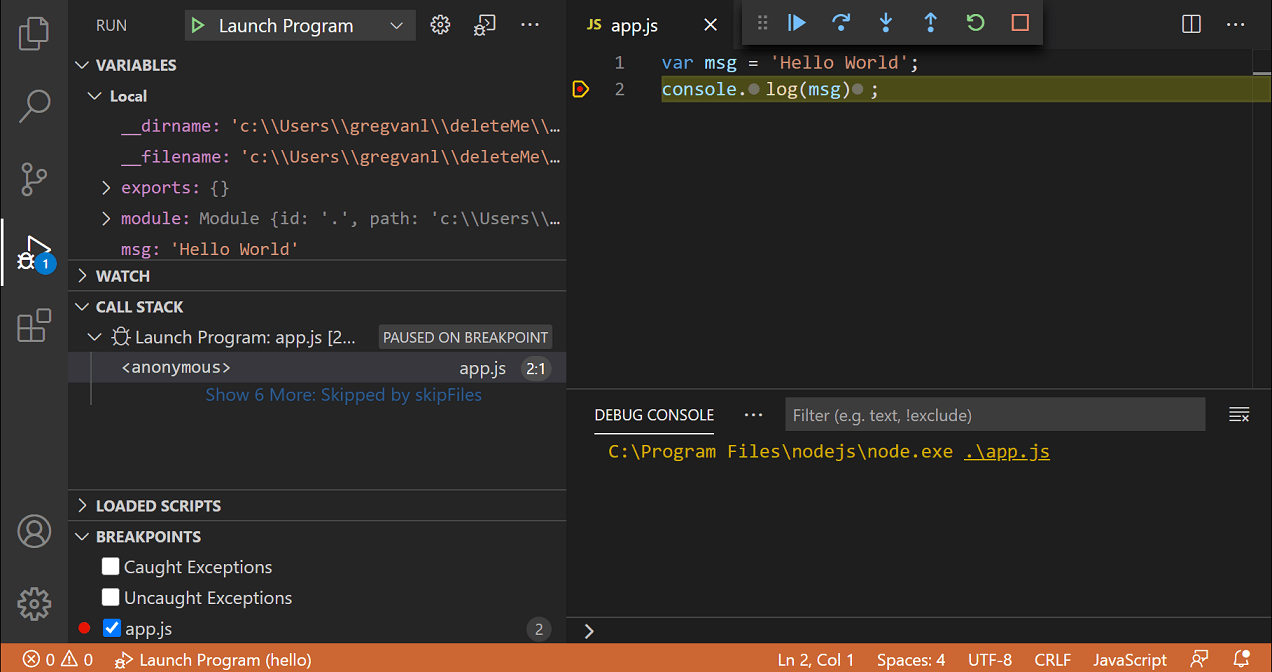
A built-in debugger in Visual Studio Code speeds up the edit, build, and debug loop.
Using the debugger aids in developing a solid understanding of what your program is doing and frequently identifies the error. Although the Visual Studio debugger is a challenging environment, with a little determination you should be able to master it and begin writing more productive and efficient code. You will benefit from the debugger as a result of the fact that developers can save time by identifying flaws early rather than later. Long-term cost savings from finding and correcting defects also result from the debugging process, which also serves to raise the software's code quality.
Programming Languages and Frameworks
With support for a wide range of programming languages and frameworks, VS Code is a real all-arounder. Its versatility spans major programming languages including JavaScript, TypeScript, Python, C++, Java, and PHP, providing a uniform platform for a variety of programming requirements. With such a wide range of support, you can depend on the same tool to handle different coding issues with simplicity and consistency whether you're working on web development, app building, or other software projects.
Linting
VS Code has linting features, Linting brings attention to visual and syntactical issues in your source code, which frequently enables you to spot and fix more subtle programming flaws or unusual coding practices that might result in errors. As a result, fewer flaws enter the production process and it allows the development of code that is easier to read, maintain, and more consistent. By enforcing its standards, Linters can assist teams in developing a more understandable and uniform style code.
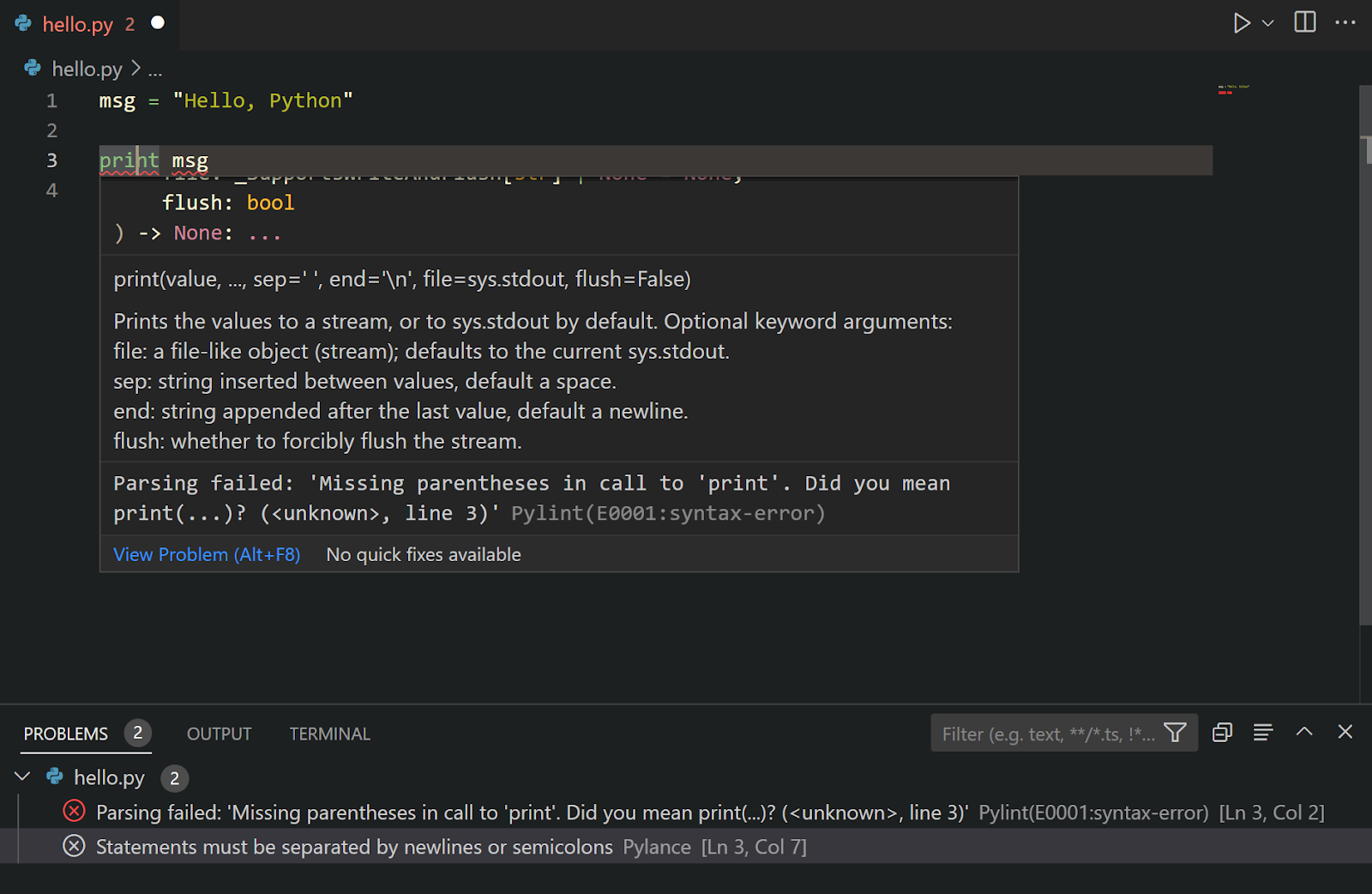
Version Control Integration
The process of monitoring and controlling changes to software code is known as version control, commonly referred to as source control. You may utilize Git in VS Code to collaborate with others and keep track of your code changes. The program's Git capabilities allow you to view your changes, make them official, and share them. Source Control is a unique section that makes it easier for you to view and manage your modifications. You may use this area to demonstrate your modifications, make a list of what you've changed, and save or share those changes.
Cross-platform Capability and Extension Support
The versatility of VS Code is demonstrated by its compatibility with several computer platforms (including Windows, Mac, and Linux) and the additional functionality you may add, known as extensions. These add-ons, or extensions, provide you with more tools and improve VS Code's coding assistance. Therefore, you may improve your coding experience with additional tools that meet your demands whether you use a PC or a Mac.
Fast and Free
VS Code has a responsive and quick performance. It is intended to utilize only a small portion of the resources on your computer because it is a lightweight code editor. This makes sure that it keeps being incredibly fast even on older computers, allowing you to write without any annoying interruptions. VS Code makes your coding experience quick and effortless whether you're using a powerful computer or one that's a little older. Its attractiveness is also increased by the fact that VS Code is free to use. It has no cost despite being quick, lightweight, and resource-efficient. The fact that VS Code is resource-friendly and cost-free makes it a great option for a variety of developers.
Finally, the user-friendly design, cutting-edge capabilities like IntelliSense and powerful debugging, seamless Git integration, and cross-platform compatibility of Visual Studio Code contribute to its appeal as an IDE. It draws beginners and professionals because of its lightweight qualities, open access, and support for several languages. VS Code is a crucial tool for improving the coding experience for programmers of all ability levels since it enables developers to write code more effectively. These are only just a few of the numerous unique features that make VS Code a favorite among programmers. I advise you to try it if you're a developer. You could truly enjoy how it facilitates your coding.
For custom software development, visit us at Zee Palm
For free premium front-end flutter kits, visit Flutter Coded Templates
Check out free Flutter Components, visit Flutter Components Library

Choosing the Right IDE for Mobile App Development
What is an IDE?
An integrated development environment (IDE) is a piece of software that aids in the productive creation of software code by programmers. Combining functions like software editing, building, testing, and packaging in a user-friendly program, it improves developer productivity. Similar to how writers use text editors and accountants use spreadsheets, software engineers also use IDEs to make their jobs easier.
Additionally, it might have features like unit testing frameworks, graphical user interface builders, and version management.
There are a few things to take into account while selecting an IDE for mobile app development.
The development platform that you want to use: Different platforms require different IDEs. For instance, Xcode is the official IDE for iOS development while Android Studio is the official IDE for Android development.
The programming language you want to use: Different programming languages work better with different IDEs than others. For instance, Xcode is made for Objective-C and Swift development, while Android Studio is made for Java development.
Your level of experience: If you are just starting out, you should pick an IDE that is simple to understand and operate. Depending on your level of experience, you might wish to select an IDE with additional capabilities and customization possibilities.
Monetary plan: While some IDEs are accessible without charge, some demand a monthly fee.
Here are some of the most popular IDEs used for app development:
Android Studio
The name of the official IDE for developing Android is Android Studio. It is based on IntelliJ IDEA and offers a variety of features that make it suitable for Android development, including a built-in emulator, graphical layout editor, and code profiler.
Pros
- A robust interface designer is included in Android Studio to create responsive layouts. The use of this visual tool speeds up UI development.
- Build management is streamlined through integration with Gradle, enabling easy compilation and deployment.
- Advanced Debugging: The IDE has sophisticated debugging and code analysis tools, which make finding bugs less difficult.
- Emulation that is flexible: The Android Emulator allows developers to test their applications on a variety of simulated devices, assuring broad compatibility.
Cons
- Resource Consumption: The abundance of features in Android Studio can occasionally translate to high resource usage, which could have an impact on system performance.
- Learning Curve: The abundance of characteristics has a learning curve, particularly for those who are new to the profession.
- Platform Restrictions: Although it shines at developing for Android, its cross-platform capabilities are constrained.
Eclipse
Eclipse is a well-liked open-source integrated development environment (IDE) that supports a number of programming languages, including Java, JavaScript, and C++. Popular and incredibly adaptable open-source IDE Eclipse facilitates the creation of mobile apps, especially for the Android platform.
Developers may easily design, test, and debug Android applications inside the Eclipse IDE with the help of the Android Development Tools (ADT) plugin. The IDE provides tools that enable developers to create complex Android apps quickly, including intelligent code completion, refactoring capabilities, and a visual layout editor.
Developers can improve their workflow by incorporating extra plugins for version control systems, build automation, etc.
Pros
- It Supports various programming languages, including Java, C++, Python, and more.
- It is a highly extendable, large ecosystem of plugins.
- It provides tools for testing, profiling, and debugging.
- It is widely used for Java development.
Cons
- It could be more intuitive than some current IDEs.
- It has performance difficulties with larger projects.
- It can be complex and daunting for beginners.
Visual Studio
Microsoft's Visual Studio Code (VS Code) is a compact yet effective IDE that is used extensively in a variety of development fields and is mainly employed for Windows development. However, with the help of the Visual Studio Codespaces extension, it may also be utilized for Android programming.
It is appropriate for mobile app development utilizing programs like React Native, Flutter, and Ionic because it supports a wide variety of programming languages and frameworks.
VS Code provides a flexible environment for mobile app development with its powerful code editing features, integrated version control systems, and rich debugging support.
Pros
- Shared Codebase: Xamarin makes it possible to create iOS and Android apps from a single codebase, which maximizes productivity.
- Using the extensive libraries and tools in the .NET environment offers a significant benefit.
- Unified UI Creation: Forms make it easier to create user interfaces, enabling developers to design user interfaces for several platforms at once.
- Instant Feedback: The ability to view a live preview provides a quick understanding of UI changes.
Cons
- Increase app size: Runtime components are included in larger apps, which results in an increase in app size.
- Platform-Specific Modifications: Some features that are platform-specific may need custom implementation, which could increase complexity.
- Feature lag: Keeping up with the newest platform features may cause native IDEs to lag behind.
Xcode
The official IDE for iOS development is this one. It is specifically made for macOS and contains several capabilities, like a graphical user interface builder and a simulator, that make it well-suited for iOS development.
Pros
- Visual UI Design: The Interface Builder enables programmers to create user interfaces visually, streamlining the design procedure.
- Performance Tools: A feature of Xcode called instruments allows for thorough performance analysis and debugging.
- Swift Playground: To encourage iterative development, Swift Playgrounds provide a platform for playing with Swift code.
- Dependency management: Swift Package Manager and integration with CocoaPods simplify library integration.
Cons
- Apple-Centric: Xcode is only designed for Apple platforms, which reduces its usefulness for cross-platform projects.
- Compatibility Issues: Regular updates can sometimes cause compatibility problems that call for adaptation.
Webstorm
Many of its capabilities, including an integrated debugger and a code editor that enables syntax highlighting and code completion, make it ideally suited for this task.
Pros
- Wide-ranging feature set for web development that includes HTML, CSS, JavaScript, and more.
- Intelligent Code Assistance: Enhance efficiency and quality with advanced completion, analysis, and error detection.
- Strong Refactoring: Tools improve code quality and maintainability through efficient restructuring.
- Version control that is integrated: Effortless cooperation is made possible by smooth Git integration.
- Real-time Live editing speeds up testing and development by allowing for instantaneous browser updates while editing code.
- Strong Framework Support: Angular, React, and Vue.js are among the numerous Node.js and JavaScript frameworks supported.
Cons
- Resource-Intensive: Heavy resource use may result in sluggish performance, particularly on less powerful systems.
- Paid License: After the trial, some users may find a paid license unworkable.
- Learning Curve: For new users, the abundance of features may present difficulties.
- Large Installation Size: Users with little storage space may have trouble with large package sizes.
- JavaScript Bias: The emphasis is primarily on JavaScript, which may not be appropriate for all programming requirements.
- Overkill for Small Projects: Excessive features may make smaller projects less productive.
IntelliJ IDEA
The JetBrains-created IntelliJ IDEA is a flexible IDE that supports a number of programming languages, including those used in the creation of mobile apps.
It offers programmers a user-friendly, feature-rich platform for creating high-quality mobile applications. Kotlin and Java-based Android projects can benefit from IntelliJ IDEA's extensive support for Android development.
Developers are able to manage their project dependencies and build configurations effectively because of its seamless interface with build tools like Gradle and Maven.
Pros
- It is known for its sophisticated refactoring, intelligent code completion, close connection with build tools, and a large selection of plugins.
- It provides high-quality support for Android and Spring Boot development.
Cons
- For certain users, the need for a premium edition (Ultimate Edition) of some sophisticated capabilities may be a barrier.
Codename One
Native applications can be created in Java or Kotlin using the cross-platform mobile app development framework Codename One.
It has an IDE of its own, which provides a streamlined development environment specifically designed for Codename One applications. But Codename One can also be combined with other well-known IDEs, such as Eclipse, NetBeans, or IntelliJ IDEA.
Pros
- Cross-platform programming saves time and guarantees a unified user interface.
- Native components and the rendering engine provide performance similar to native.
Cons
- The learning curve for the architecture and ideas of the framework.
- Limited ability to customize distinctive design aspects.
NetBeans
Another open-source IDE that is suitable for developing mobile apps for various platforms is NetBeans. It is renowned for its adaptability and broad language support.
A variety of tools, templates, and functionalities offered by NetBeans simplify the development process.
Pros
- Features like version control, a GUI builder, and profiling tools are included, in addition to compatibility with Java, PHP, and other languages.
Cons
- It could not be as frequently updated as some other IDEs, which could cause compatibility problems with cutting-edge technologies.
The selection of an IDE is essential for facilitating the processes of editing, debugging, testing, and deployment of code, whether one is aiming for cross-platform development, Android, or iOS.When choosing an IDE, it's also important to take the availability of extensions, community support, and integration with pertinent frameworks and tools into account.
The correct IDE ultimately enables developers to produce high-quality mobile applications, streamline the development process, unleash their creativity, and produce gratifying mobile app user experiences.
For custom software development, visit us at Zee Palm
To buy premium front-end flutter kits, visit Flutter Coded Templates
Check out free Flutter Components, visit Flutter Components Library

The Future of Software Development: Trends, Challenges, and Opportunities
Software is a group of coding instructions used to control and direct computer hardware. Software is the soul of the hardware, which is its body. Since computers are unable to function independently. The only thing that can show you what's happening and let you control the computer with a single click is software.
The software industry is continually changing. Over time, new software trends emerge. The nature of revolution is to adapt to the expanding demands of the consumer market. The future of software development has been promising since the 19th century. However, the end still needs to be fixed.
Software development has a bright future ahead of it, thanks to several innovative new technologies and methodologies that are about to revolutionize how we create and use software. The technologies available to developers now are more diverse than ever, ranging from AI and low-code development to cloud computing and blockchain.
Take Software Development into Account
There are numerous software developers for desktop apps, mobile apps, languages, operating systems, online frontends, and backends. But everyone adheres to a standard development principle. These fields may experience considerable advancements. These are:
1. Automation:
Automation streamlines the task of the developer. In software development, a developer must write, test, and deploy such codes. In automation, tests or deployment are carried out automatically by the written codes. The developers benefit greatly from these time savings.
2. Security:
Security is crucial in every area of technology. Online activity by other parties and criminals is possible. To safeguard their software and users, developers utilize firewalls and antivirus software. These firewalls and antivirus programs receive regular updates from developers.
3. UI Design:
The user interface is the area where users interact with a system. A better and more user-friendly UI will thereby draw users. Enhancing the software's usability, accessibility, functionality, and display design encourages users to use it.
Current Trends of Software Development
The course that software development followed in 2022 will be continued in 2023. However, we'll probably be surprised by fresh developments in well-known markets and technology, particularly as they gain in popularity. Companies in the fields of AI, IoT, and AR/VR/MR have already announced several exciting releases for the next year. As the year progresses, new trends may probably emerge.
Software developers and IT professionals are essential to the development of the post-pandemic world since digital products dictate the development of resilient and sustainable businesses. Let's examine the methods and tactics they employ to get better outcomes.
Trend #1 — Cloud computing:
The adoption of cloud-native solutions for app development, team management, and communication is expected to increase among software development organizations, according to the trend. Public, private, or hybrid clouds are used to host these software items and services. They can run on numerous servers and are infrastructure-neutral, so any business can simply use them.
In 2022, governmental agencies and organizations as well as startups and established companies all adopted cloud computing. The importance of the technology is acknowledged by hospitals, security agencies, legal authorities, and even the Pentagon. By the end of 2024, a sizable number of organizations and institutions may have switched to the cloud globally, not only in the US.
One of the most well-known developments in the software industry is cloud computing, which is so since making the switch has never been simpler. Currently, all multinational corporations are making investments in the technology (with the leaders being Google, Amazon, and Microsoft), enabling cloud computing for both enterprises and consumers. To test whether the Cloud infrastructure meets your demands, you can even receive free credits for the first month.
Trend #2 — The Rise of Python
Python is a language that may be used for any type of modern development. This language can be used for web development, mobile development, or enterprise projects. Python's capacity to enable performing sophisticated mathematical operations, data analysis, machine learning, and neural network construction sets it apart from other universal languages.
JavaScript has long dominated the list of programming languages that software engineers use the most in the globe. Python has been climbing that ranking quickly since 2020, and in December 2021, it succeeded in taking the top spot.
Python was rated as the best computer language in June 2022, according to the most recent updates of the TIOBE and PYPL indices. Given that Python is the language of choice for programmers building software solutions with AI- and ML-based capabilities, it appears that its rising popularity will last far into 2023 and beyond. As was already said in this post, one of the top trends in software development for 2023 is artificial intelligence.
Trend #3 — TensorFlow Boosts AI Development
For many years running, artificial intelligence has been at the top of lists of technological advances, and in 2023, that won't change. Large enterprises and smaller startups both continued to invest in artificial intelligence last year. Users become more acclimated to utilizing AI for routine tasks every year, but it doesn't spark many ethical discussions. Innovative AI programs can process photos, identify objects, and comprehend spoken language.
According to IMARC Group, the worldwide artificial intelligence market will be worth $56.5 billion in 2021. This amount may rise to $308.5 billion by 2027. Programmers use specialized AI libraries and frameworks to implement deep learning techniques while developing such software systems. The adoption of TensorFlow for AI development is one of the key trends in software development this year.
The use of AI in software solutions also moves from being nice to a need for developers. Google created TensorFlow, a library for creating neural networks, after noticing this tendency. It gives programmers a quick environment for creating and testing neural networks when used in conjunction with Theano, one of the most well-known AI frameworks.
Trend #4 — 5G network
Although the 5G network has been in development for some time, communications professionals are certain that it will launch this year and become one of the top IT trends by 2023. The primary cause of this is that the technology enables businesses to fully utilize IoT ecosystems. The performance displayed by linked devices improves with increased communication reliability.
For programmers, it implies that connectivity will considerably increase and users will be able to access global internet offers. Additionally, it refers to increased mobile connection speed, a necessary need for integrating sophisticated advances like machine learning or augmented reality into mobile apps.
Businesses may exploit value by adding more connected devices to their business operations thanks to 5G networks. For instance, IoT and 5G support digital transformation in manufacturing, logistics, healthcare, and other industries.
Trend #5 — Infrastructure as Code (IaC) Eliminates Management Issues
With all the clusters, microservices, containers, APIs, serverless operations, and interdependencies that developers need to be aware of, today's application development environments are complex. DevOps specialists are constantly under strain in these circumstances since they have to guarantee app security and stability. The development of code must be accelerated, and deployment must be even quicker, at the same time.
DevOps teams are embracing IaC, a technique for managing, automating, configuring, and promoting continuous improvement on dynamic computing resources, as a result. In the past, organizations relied on a small number of extremely talented people who knew what their code depended on and how it was supplied, leading to bottlenecks and dependencies. Such problems are eliminated by the IaC practice
A company's DevOps team can use IaC to develop a single, trusted code base that will be used to monitor that apps are delivered by security guidelines. Teams may track code inconsistencies using IaC, which makes it simpler to remedy problems. By using this method, it is feasible to incorporate the optimal configuration guidelines into the security guidelines and policies of the organization.
Trend #6 — No-Code Speeds Up Software Development
With a new method of developing software solutions known as low-code/no-code (LCNC) development, software engineering is going in the direction of simplification. The need for software development is ever-growing. Even sectors like agriculture that aren't naturally digital are seeing a rapid digital revolution. Many business owners realize the need for digital solutions but don't view employing a software development team as a top-priority investment.
LCNC platforms use graphical user interfaces and setups to make it possible for almost anyone to create software without using traditional coding. Such programming environments have a lot of potential since they enable individuals with little to no software development experience to turn their concepts into digital solutions.
Software development can be executed more simply using responsive graphical interfaces, just as the design was made easier with tools like Canva and PicMonkey. With tools like Wix and Webflow no-code development has been a popular trend in web design for some time. This trend will spread to other areas of software development in 2024.
Trend #7 — The Development and Ascent of DevSecOps
For many years, DevOps has been a practice that is frequently utilized in software development firms. The DevSecOps concept is becoming more and more popular, as seen by current trends in software development. Teams are united for the same goal and may create products of greater quality when development and testing are merged. Without needing to rewrite the functionality, developers, and testers may start building the product following best practices from the very beginning by sharing responsibility.
However, one component of the jigsaw was frequently left out of the typical DevOps system. Testing frequently omitted important security procedures, leaving the finished product vulnerable to online attackers. This problem can be solved by using the DevSecOps development approach, which places security at the centre of the endeavor.
The development of DevOps is DevSecOps. The conventional function of the security division in code development is changed by this strategy. Before, QA experts joined the process once the primary development stage was over. In line with the DevSecOps methodology, their involvement is required at all times.
As a result, security procedures are now a crucial component of the entire development process, beginning with the design of the app architecture. This enables you to spot problems at an early stage and fix them right away, rather than letting them build up in the program until the very end.
DevSecOps's ascent can be attributed to the growing popularity of cloud-native app development and microservices, as well as the ensuing demand for speedy problem-solving in these intricate architectural designs.
Many other trends have been upgrading day by day and beyond 2024 it’ll have an immense impact on software development.
Current Challenges of Software Development
Any organization's ultimate goal is to create a high-quality product, but the software development process is changing as automation spreads widely and new tools and libraries are being created every day.
The process of creating software is challenging and complex. Given the ongoing development of industry standards and technology, it presents its own unique set of difficulties, particularly for modern developers. Software developers' productivity may suffer from their inability to manage projects, stay up with developments in developer tools, and deal with rising customer demands. It is essential to comprehend these difficulties and how to go through them.
Software Developer Challenge 1: Unestablished Project Infrastructure
A typical software development difficulty in terms of how it affects project delivery is an unestablished project environment. If the environment is unavailable, there is no way to complete your project on schedule and within your projected budget.
Solution:
During the development, testing, and user acceptance testing (UAT) phases of a software project, test and pre-production environments should be made available to facilitate efficient project development. Improve the environment for software development by making an early investment in a reliable IT infrastructure.
Software Developer Challenge 2: Keeping Up with Changing Requirements
The ongoing alteration of requirements is one of the main causes of the complexity of software development projects. Unsurprisingly, designing products with vague needs is cited as the largest issue by 33% of respondents to the Stack Overflow Developer Survey. Understanding exactly what a project will provide is the goal of requirements gathering, which is much more than just a group of business consultants coming up with their perfect product.
Solution:
A reliable method and channel of communication must be built to guarantee that the product outcomes match expectations and objectives. Keep in mind the following suggestions.
- Define and concur on the project's scope.
- Never presume the demands and expectations of the end user.
- Between the development and ideation teams, communicate the needs and expectations.
- Include customers in the process of updating existing products right away.
- Beginning with the creation of new products, take UX into account
- Confirm your comprehension of the needs by creating a clear, succinct, and comprehensive requirements document.
- Make a prototype to verify and/or improve the last set of requirements.
Software Developer Challenge 3: Quality Assurance
Software engineers often skip code reviews or hide defects to speed up development and fulfil deadlines.
Solution:
For a launch to be successful, it is crucial to adhere to a systematic quality assurance approach. Discourage it right away if you see engineers trying to skimp on the software product development process. To achieve the criteria more quickly and effectively, encourage them to apply the finest code development practices.
Software Developer Challenge 4: Undefined Quality Standards
Even though the product has undergone extensive unit testing during the development phase, defect finding is unavoidable during functionality testing.
Solution:
When developing your test strategy, scenarios, conditions, cases, and scripts, be sure to schedule several testing cycles to ensure that your test plan fully addresses all of the requirements that need to be provided.
Software Developer Challenge 5: Proper Software Project Management
Multitasking frequently causes more problems than you anticipate. If a resource manager overburdens them with work, they are unable to concentrate on a particular task or module.
According to Ryan Chan, founder and CEO of UpKeep Maintenance Management, "You have to be an excellent planner to be successful in project management."
Solution:
Utilizing project management solutions, such as Project Pro in O365, to keep projects, resources, and teams organized and on schedule is an obvious approach to being a great planner. Keep on track, meet all deadlines, collaborate seamlessly across applications, and manage your projects effectively and easily. Always assign tasks sequentially rather than concurrently, and encourage your resources to give their all in all they undertake.
In Software Development many other problems have been faced but those all are being solved with appropriate solutions.
Advancements/Opportunities In Software Development
New and fascinating trends and changes appear every year. One industry where dynamicity is constant is technology. Additionally, the development of software for the aim of digital transformation is increasingly crucial to every industry in the globe.
Here are some advancements in software development:
1. Robotic Process Automation
Robotic Process Automation is now being developed by numerous businesses to ensure smooth operations. RPA is used to handle tasks effectively and increase workplace efficiency.
Robotic Method Automation is also utilized to replace people with machines for boring, repetitive tasks. For instance, RPA can be used to automate operational functions like hiring new employees and completing reviews.
RPA is a significant development in the field because it helps experts handle more duties. Additionally, it aids in accelerating people's rates of productivity. Therefore, RPA can support seamless innovation through thorough study and strategy by using ML chatbots or other automated programs
2. Digital Transformation Enablers.
Often, there is pressure on organizations to digitize every area of functionality. Everywhere, from workplace administration to customer interactions, digitalization has left its stamp.
Digital transformation essentially involves the conversion of traditional or human-centric operations or tasks into digital formats. Even while it may sound intriguing, for it to work to its full potential, a proven mechanism is needed.
When it comes to digital transformation, it is essential to stay current with the market. It could take several years for a complete metamorphosis to occur. However, by making investments in various instruments, this process can be hastened.
With these expenditures, businesses can adopt seamless workflow and accelerate the innovation cycle.
As a result of a variety of trends, opportunities, and problems, software development is set for a considerable transition in the future. Software development is changing to accommodate the growing demands of the consumer market as technology advances. The variety of technologies that are now readily available, ranging from blockchain and low-code development to AI and cloud computing, promises to fundamentally alter how software is developed and used. While issues such as a lack of project infrastructure, shifting needs, and quality assurance still exist, these issues can be resolved with the help of effective project management, communication, and rigorous quality assurance. Additionally, there are many prospects for developments in the field of software development, including RPA, which improves operational efficiency, and digital transformation enablers, which propel companies towards an inventive and seamless future. The cooperation of software developers, IT experts, and technical trailblazers will play a crucial role in determining the trajectory of software development after 2023 as the sector continues to develop.
For custom software development, visit us at Zee Palm
For free premium front-end flutter kits, visit Flutter Coded Templates
Check out free Flutter Components, visit Flutter Components Library

Writing Neat And Maintainable Code: Best Practices And Tools
Have you ever seen code that was so poorly written that you could not understand what it was doing? Or maybe you’ve had to debug code full of duplication and errors? If so, you know how important it is to write neat and maintainable code.
But what is neat code? And why does it matter?
Neat code is easy to read, understand, and maintain. It is well-organized, consistent, and error-free. Neat code makes it easier for developers to work together, and to find and fix bugs.
In this article, we will go through the importance of neat code and look at some tips for writing it. Following are some popular practices and tools to code neatly.
1. Readable and Modular Code:
The readability of the code can be improved by using clear and concise language, meaningful names, Using comments where needed.
Modular code is code that is broken down into smaller self-contained units such as methods, header files, etc. Each module should have a single well-defined purpose.
For a large-scale software project with thousands of lines of code, if the code is not readable and written in a modular way, it will be difficult for other developers to understand and use. This can lead to compatibility issues and problems with the software that uses the library.
Readable and Modular code will make your software more efficient, reliable, and bug-free, and improve the overall quality.
2. Consistent Formatting:
Consistent formatting is the practice of using the same style and conventions for the entire software. This makes your code easy to read and understand.
Code can be formatted in many ways, most popular conventions include :
- Consistent indentation, using four spaces is common practice.
- Consistent naming conventions for variables, functions, and classes, snake_case is used for variables and CamelCase for functions.
- Consistent white spaces around and operands, a single space is practiced commonly.
- Consistent line breaks and spacing, single line breaks between functions.
Automated formatting tools can be used to maintain consistent formatting across a codebase. There are many automated formatting tools available such as prettier and autopep8. These tools can be configured to apply a specific style to your code, they can be run automatically on save or during pre-commit hook.
Following these practices makes your code consistent with coding standards, makes collaboration easier, and helps to reduce merge conflicts.
3. Code Testing:
Code testing is the process of executing code to verify it meets expected requirements. It is an essential part of software development, it can help to identify and fix bugs early in the development process. Testing helps to prevent bugs from being introduced into the code later on, which can make the code more difficult to maintain. It helps to ensure the code is well-designed and modular. Testing can help to improve the overall quality of code making it reliable, and maintainable.
Starting tests earlier in the development process, testing frequently, using a variety of testing techniques, and getting feedback from other developers on your test can help in producing reliable and bug-free software.
4. Version Control:
Version control allows you to track changes to your code over time. This means that you can easily revert to a previous version of code if you make a mistake or if you need to experiment with different changes. It allows you to create branches of code, so you can experiment with your code without making changes in the actual codebase. It allows you to collaborate with other developers on the same codebase. It allows you to tag specific versions of your code, helps keep the code organized, and avoids merge conflicts.
Some popular version control systems include Git, Mercurial, and Subversion. The best version control system will depend on your specific needs and preferences.
5. DRY Principle, Do Not Repeat Yourself:
This principle encourages code reuse by extracting common functionality into methods, templates, or libraries. The DRY principle states that every piece of knowledge should have a single, unambiguous representation.
This practice makes your code more readable and maintainable. When you duplicate code, it can be difficult to keep track of all the different copies. This can make your code difficult to understand and maintain. Reusable code helps you write more concise and efficient code. When you duplicate code, it is more likely to introduce bugs. Reusing code also saves time and effort.
- Some widely practiced DRY principles are:
- Using functions to encapsulate common functionality
- Classes are used to group related functionality together
- Creating Libraries to collect related functions and classes together
- Using version control to track changes in your code
Following these practices, you can write DRY code that is easier to maintain.
6. Documentation:
Documentation is the process of providing information about your code. This can include the purpose of the code, how to use the code and any important considerations.
There are so many ways to document your code, some commonly accepted methods include commenting, writing documentation files to provide more detailed information about your code such as usage, purpose, or any important considerations, and using automated documentation tools such as Confluence, PandaDoc, and Sphinx, etc.
By documenting, you make it easier for other developers to understand and use your code. The best documentation tools/practices for you will ultimately depend on your preferences and requirements.
Writing neat and maintainable code is essential for effective software development and every developer should aim to achieve it. Neat code is easy to read, organized, and free from errors, making it simpler for developers to collaborate, identify and rectify bugs, and enhance software quality. We have discussed several important practices that will help you to write better code.
The combination of these practices tailored to your project requirements will pave the way for code that is not only maintainable but also efficient and conducive to collaborative development. By implementing these practices you can contribute to a smoother development process and higher-quality software.
For custom software development, visit us at Zee Palm
For free premium front-end flutter kits, visit Flutter Coded Templates
Check out free Flutter Components, visit Flutter Components Library

How to Gather and Utilize Input for App Improvement
The growing importance of mobile experiences to your consumers gives both an opportunity and a duty for your app to deliver a compelling app experience. Now is the perfect time to start gathering user feedback as part of your digital communication plan.
Consumers are spending more and more time on their mobile devices and expanding app categories in a world that is becoming more and more digitized. For instance, people spent 8% more time in 2021 viewing live TV than they did on their mobile devices. It goes without saying that your users are deeply engrossed in their phone screens.
Users have a clear understanding of what they want your application to do when they launch a session of your app or software. You lose clients if your product doesn't assist your users in achieving their objectives or if it takes too long.
More consumers will be gained and fewer will be lost if your product development team can identify and address sources of friction in the user experience faster.
Three Reasons Your Mobile App Needs User Feedback
- In-App Experience Improvement.
- Verify Your Presumptions.
- Protect Resources.
How to Collect User In-App Feedback
Within your app, you may gather feedback in a number of ways. To make sure they receive enough input, many product teams choose to combine several techniques.
1. Customer Feedback Widgets:
You may track and gather customer feedback in real-time with the aid of a customer feedback widget. It can be customized to meet your needs and placed anywhere in the app. They allow your users a quick and easy way to share their opinions about how well your program works.
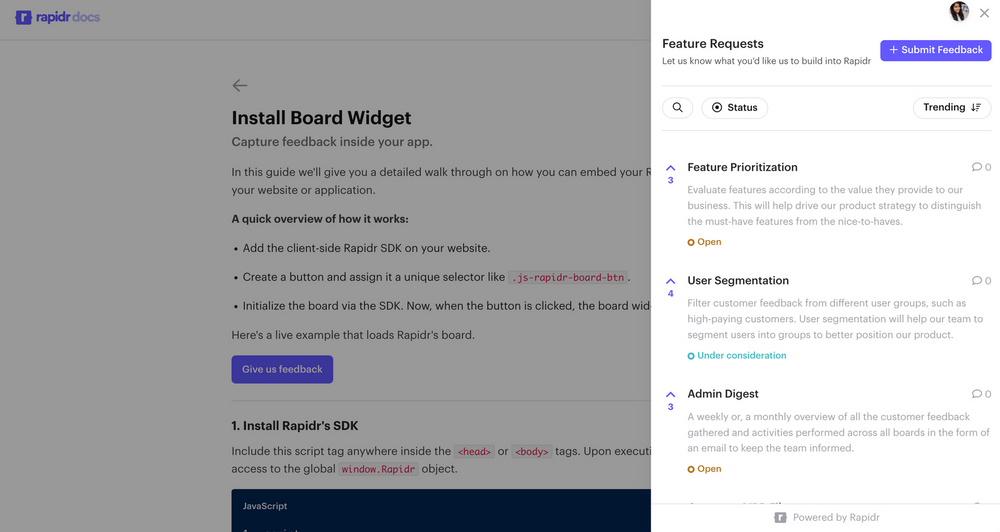
To gather client input and improve their products, several businesses employ in-app feedback widgets on their mobile applications. These widgets provide open-ended feedback and let users provide text, image, and video input. To segment replies for analysis, product managers frequently include two to three questions in the widget. Typical questions include:
→ Introduce a fresh function.
→ Report a problem.
→ Let us know what you enjoy.
Utilizing these feedback widgets has several advantages because it gives businesses insight into what customers need and how they use the product. Additionally, it enables them to get insightful feedback that they may use to inform upcoming product revisions.
Success advice for in-app widgets:
a. Create a discoverable feedback widget:
The finest results from these widgets are obtained when they are consistently and easily accessible. Set them up as top-level menu items, page gutters, headers, or footers, or as an always-visible icon in the bottom right corner of the app.
b. Make this method of feedback optional:
Be selective about when and what input you solicit because users are only willing to provide so much feedback at once. If both requests automatically appear during the length of the app session, let's say you also want to get contextual feedback about a feature you recently launched, you run the danger of overwhelming or upsetting your users.
2. User Satisfaction Surveys:
User satisfaction surveys within the app can be automatic, contextual, or optional. They often appear following a user's use of a new feature that you hope will enhance their experience.
Customers might be surveyed to learn more about their experiences and requirements or to provide input on new features. NPS, CSAT, and CES surveys are just a few examples of in-app surveys that are excellent for gathering quick and simple customer feedback.
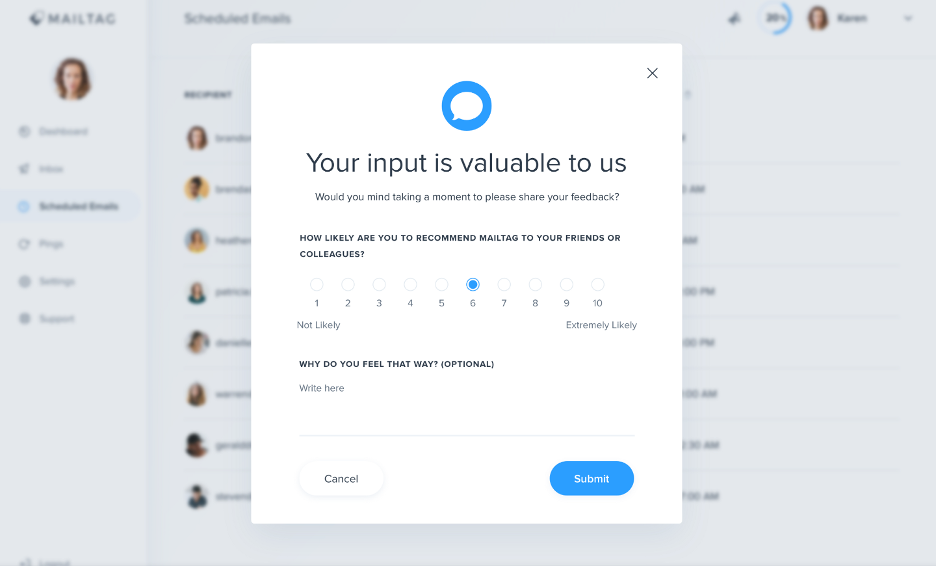
The Customer Satisfaction Score (CSAT) framework, which asks a user to score their satisfaction with a feature on a scale of 1 to 5, is most frequently used in these customer surveys. A score of 5 indicates "highly satisfied," while a score of 1 indicates "highly dissatisfied." To provide you with a comprehensive view of user sentiment levels, the ratings from your in-app user feedback mechanism should be combined.
The Net Promoter Score (NPS) is a practical metric for assessing customer loyalty. Users who are happy with your app could even favor some of its features, but they might quickly move to another app if they see one with a little lower pricing. NPS surveys mimic satisfaction surveys in terms of structure. As an example, "On a scale of 1 to 10, how likely are you to recommend this app to a colleague or friend?" is a question they use as their opening. Ratings of 7 or 8 suggest satisfied consumers who require a little more encouragement to become devoted users, while ratings of 9 or 10 come from your most devoted users.
The usage of user satisfaction surveys in context makes providing input easier for consumers because email surveys have very low response rates. Short and simple in-app surveys would boost response rates and aid in user screening for customer interviews.
3. Shake-to-Send Feedback:
Apps are increasingly featuring feedback buttons. They collect user reviews of the app and its features. The feedback button is a straightforward but efficient method of gathering customer feedback on a service, application, or website. To learn what users think of a product, what they would want to see in new versions, and how they use it, feedback buttons can be employed.
Shake-to-send is a feature that many mobile apps employ in an effort to be less intrusive. Users can access a menu of feedback options by merely shaking their phones.

Shake-to-send prevents users from losing their in-app context when they want to leave feedback, just as other methods of in-app user input. To give feedback, shake your phone or tablet. This takes a screenshot of your Google Maps window to better explain the situation. If this screenshot is not required, you can delete it. Shake-to-send advice for success:
a. Inform your users about this form of feedback:
Not every app user will be familiar with this feature. To draw attention to the shake-to-send feature during user onboarding, either include more feedback options or utilize subtle in-app messaging.
b. Permit users to decline:
If a person mistakenly activates this feature, they can find it annoying. Give them the chance to mute it.
4. App Analytics Feedback:
Digital insights technologies like Heap enable behind-the-scenes app analytics feedback. It automatically collects quantitative information on crashes, user abandonment, conversion rates, and other topics. The benefit is a greater comprehension of how particular users interact with your software without actively soliciting input from them.

Let's say you're trying to decide where to put your open-ended feedback widget. In order to determine which in-app placement encourages the most widget usage, Heap enables you to program an A/B test.
The most important tip for using analytics in apps:
a. Analyze both qualitative and quantitative data from analytics:
Even if Heap and similar tools can point out intriguing patterns, they can't tell you the complete picture. Adding data from CSAT surveys and feedback widgets to any behavioral analytics tools is a complement because of this.
For instance, app analytics may reveal that a significant portion of customers leave their shopping carts before reaching the final checkout screen. Once you've ruled out technical difficulties, you might need to program a survey to learn more about why they're giving up.
Best Practices for In-App User Feedback Collection
1. Integrate Business Intelligence Tools and In-App Feedback:
You won't benefit from keeping the consumer input you obtain from diverse sources in separate silos. To better understand your users, make sure you have a means to compile input from various sources in one location.
Frequently, a CRM like Salesforce serves as that lone location. The best CRMs interact with social media networks, email service providers, and even in-app feedback mechanisms. Specific client profiles are linked to the data pouring in from various other sources by the CRM.
2. Allow Time for Users to Form an Opinion Before Requesting Feedback:
Make careful considerations while setting the timing for your survey pop-ups, NPS pop-ups, or rate-my-app notifications if you're actively seeking feedback from users of your app.
It takes time for users to establish opinions. A badly timed feedback request ends their app experience and takes their attention away from what they were trying to do.
Best Resources for Gathering App User Feedback
1. Rapidr:
Rapidr is a platform that helps manage the full feedback lifecycle, from gathering feature requests to prioritizing features, guiding product planning, and distributing product updates with a changelog. It is a customer feedback management software, mobile app feedback, and feature tracking tool.

2. Apptentive:
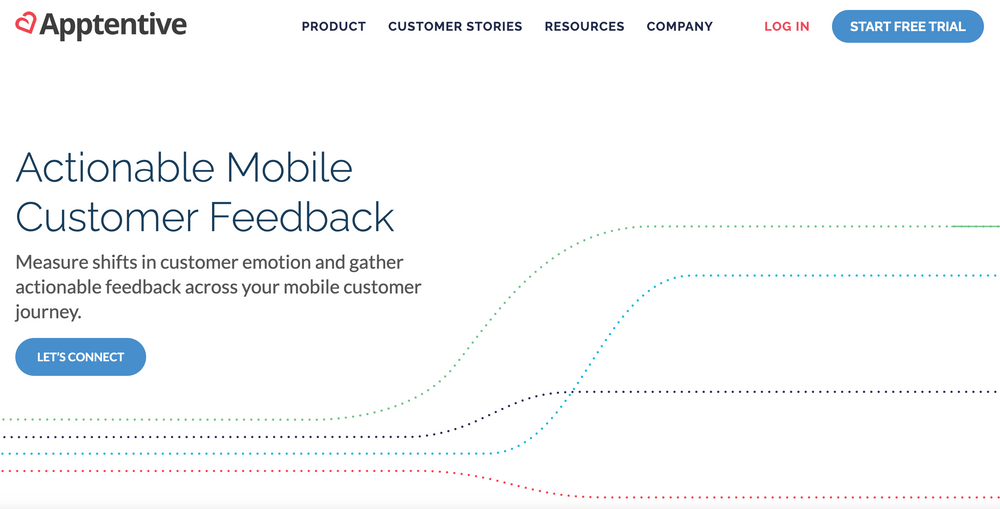
Businesses may use Apptentive to track changes in customer sentiment and collect useful feedback throughout the mobile customer journey. To gather various consumer feedback, Apptentive enables in-app surveys. It also allows users to submit in-app notes to share updates and information with other app users. It assists in gathering specific user feedback to raise the caliber of the software.
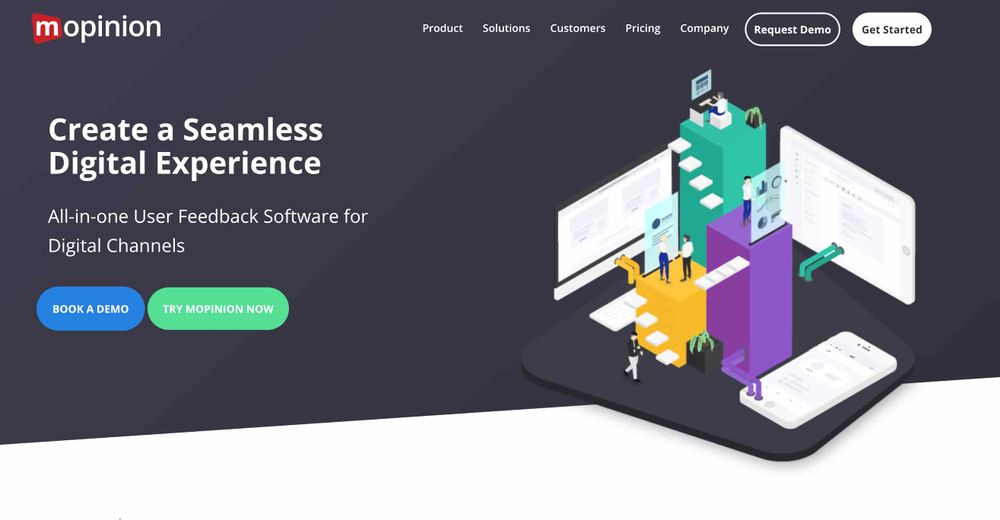
3. Mopinion:
With the help of Mopinion, users can design fully configurable online in-app feedback forms that may be triggered by a variety of criteria, including mouse movement, exit intent, and other CX metrics like NPS, CES, and CSAT.
Through the use of its adaptable and simple-to-install SDKs for iOS and Android, it assists in gathering in-app feedback. Text analysis, labeling, and visualization in individualized dashboards are also included. Users can respond to comments by using proactive alerts and role-based views.
There are many other tools that are the best resources for gathering feedback for users such as InstaBug, SurveyMonkey, and HelpShift.
Developers must collect and use user feedback in a thorough and considerate manner in order to produce successful and user-centric products. Users must be actively listened to in order to gather information about their preferences and problem areas, which must then be analyzed in order to draw conclusions. The functionality, features, and user experience of the app can then be enhanced using these revelations. In addition to fostering greater user engagement and loyalty, a user-centered approach to app development places apps in a position for long-term growth and innovation. The process of acquiring and utilizing consumer input will become ever more crucial as technology develops. Developers may produce apps that are genuinely beneficial to their customers by iterating and enhancing them constantly depending on user feedback.
For custom software development, visit us at Zee Palm
For free premium front-end flutter kits, visit Flutter Coded Templates
Check out free Flutter Components, visit Flutter Components Library

Challenges of Turning Bugs into Features
What is a Bug?
A bug is an error in a computer program that causes it to behave unexpectedly. No matter how careful you are, there will always be some bugs that slip through the cracks. The average software application contains 15-50 bugs. But what if the bug turns out to be more than just an inconvenience? What if it turns out to be a new feature that is valuable to the users?
This is the challenge of turning bugs into features. It's a delicate balancing act that requires careful consideration of the risks and benefits involved. On the contrary, there is always the risk that the bug could have unintended side effects, or they could be difficult to integrate with other features.
In this story, we will explore the challenges of turning bugs into features. We will look at some factors you need to consider, and we will provide some tips for increasing your chance of success.

1. Inexplicable Nature of Bugs:
Sometimes, an error that may look like a bug is not actually a bug. It can be an undocumented feature or functionality that was not apprehended during the development process. This can happen due to incomplete specifications, miscommunications, or changing requirements.
Example:
- The sticky keys feature in Microsoft Windows: It was originally a bug. When you press the shift key five times in a row, the keyboard repeats the last character you typed. It was later discovered that some people with disabilities found it useful. The bug turned into a feature, and it is now a standard accessibility feature in Windows.
- Copy and paste feature in word processors: When the first word processors were developed, they did not have a copy and paste feature. However, users quickly discovered that they could copy and paste the text by using Ctrl + C, and Ctrl + V hotkeys. This was originally seen as a bug, but it was later turned into a feature.
Software bugs are a common occurrence. However, not all software bugs are problematic, some bugs are harmless, It is important to be aware of the potential impact of any software bug before deciding how to address it.
2. Problems with Reproducibility:
Reproducibility is the ability to consistently reproduce a software defect. This is often difficult to do, as software defects can be slippery and may only occur under certain conditions. A study by Microsoft found that only 23% of the software defects are reproducible. And according to IBM, the average time to replicate a bug is 15 hours.
Example:
- Google’s Blank Searches: In 2017, Google experienced a bug in its search that caused users to see blank search results. The bug was difficult to reproduce, and it took Google engineers several days to track down the cause and fix the problem.
This elusive nature of software bugs can make it difficult to develop effective testing strategies. The cost of fixing a software defect that is difficult to reproduce can be up to 10 times higher than that of a reproducible bug.
Imagine an e-commerce application where users occasionally encounter errors during checkout, resulting in abandoned carts. This periodic nature of the defect makes it difficult to pinpoint the origin of the problem. Developers would need to carefully track the conditions under which the checkout error occurs in order to reproduce it consistently. Once the bug is reproducible, developers can focus on fixing it.
3. Unforeseen Side Effects:
One of the biggest risks of turning a bug into a feature is unforeseen side effects. Bugs can have complex and unpredictable consequences. A study by Carnegie Mellon University found that the average cost of fixing a software defect with unforeseen side effects is $100,000.
Example:
- Sticky Keys in Microsoft Windows: The sticky keys example discussed earlier had unforeseen side effects. It can be difficult to turn off and it can interfere with some games and applications.
- Infinite Scroll in Social Media Apps: Infinite scrolling was initially a bug, but users found it addictive. When users reach the bottom of the feed, the app would continue to load new content without stopping. An unforeseen side effect apart from users spending more time than intended, it is difficult for users to find the content they are looking for.
To avoid unforeseen side effects, it is important to carefully consider the potential impact of any bug before turning it into a feature. This includes understanding the bug's root cause, its potential consequences, and the way it interacts with other parts of the software.
4. Integration Complexities:
The interconnected nature of software means adding new features, even one derived from a bug can disrupt the harmony of existing systems. This is because the software is often made up of many different components that interact with each other in complex ways.
A study by IBM shows 40% of software defects are caused by integration problems, it is important to carefully consider the potential impact of any new feature on the overall system before making changes.
Example:
- Boeing 737 MAX: In 2017, a bug in the software of Boeing 737 MAX caused the aircraft to crash twice, killing 346 people. The bug was caused by an integration problem between the aircraft’s autopilot system and its flight control system.
- Target point-of-sale: In 2013, a bug in the software of the Target Corporation's point-of-sale system caused the personal information of millions of customers to be stolen. The bug was caused by an integration problem between the system's customer data and its payment-processing software.
To lessen the risk of integration problems, it is important to perform integration testing. It ensures all the features and functions work well together. Using a version control system to track changes to the code can make it easier to identify and fix integration problems.
5. User Value Assessment:
Not every bug is worth turning into a feature even if it's technically feasible, it is important to consider whether the feature will be valuable to the users. For instance, a text editor might have a bug that causes unexpected line breaks. This bug could be turned into a "creative formatting" feature, but users might find it more frustrating than innovative. In this case, it would be better to fix the bug rather than turn it into a feature.
According to a study by Google, only 10% of bugs that are turned into features are actually acknowledged by users. 90% of the time, developers are wasting their time and resources on features that no one wants.
Example:
- The Creative View Feature: In the early days of the internet, some websites had a bug that caused them to display upside down. This was turned into a Creative Viewing feature, but users found it disorienting and did not use it.
- Windows Minimalist Feature: In the Windows operating system, there was a bug that caused the taskbar to disappear when you clicked on a window. This was turned into Minimalist feature. Users found it inconvenient and did not use it.
The decision of whether or not to turn a bug into a feature is a complex one. There is no one-size-fits-all answer, the best decision will vary depending on the specific bug and need of the users.
Bugs can be turned into features, but it's not always a good idea. Developers need to carefully consider the bug’s behavior, potential side effects, and user value before making a decision
If the bug is valuable to users and can be implemented without introducing any problems, then it may be worth turning into a feature. However, if the bug is not valuable to users or could cause problems, then it is best to fix the bug instead.
Developers should weigh the risks and benefits of turning a bug into a feature, it is a judgment call that must be made on a case-by-case basis. By carefully considering all the factors discussed above, developers can make an informed decision.
For custom software development, visit us at Zee Palm
For free premium front-end flutter kits, visit Flutter Coded Templates
Check out free Flutter Components, visit Flutter Components Library

Debunking Myths About Mobile App Development
The process of creating a mobile app is difficult and complex, but it can also be incredibly rewarding. Mobile applications have assimilated into our daily lives in the fast-paced digital world of today. Mobile apps meet a variety of purposes, from communication and work to shopping and entertainment.
More and more businesses and people are turning to the quickly growing mobile app development market to reach customers and improve operations. Due to the abundance of information available online and the constant growth of technology, it can be difficult to tell fact from fiction when it comes to mobile app development.
However, there are a lot of myths and misconceptions about developing mobile apps that can make it challenging for companies and individuals to begin.
We'll dispel 10 of the most widespread misconceptions about creating mobile applications.
Myth #1: It's Expensive to Develop Mobile Apps
One of the biggest misconceptions about creating mobile applications is this one. Mobile app development can be costly, but the price depends on the complexity of the app, the features that are needed, and the platform that is being utilized. There are numerous platforms and technologies available that can assist developers in producing mobile applications more affordably.
Cost savings can be achieved through efficient planning, project management, and the use of already available resources. Unnecessary costs can be reduced by effective resource allocation, defined project scopes, and productive teamwork.
Myth #2: Developing mobile applications takes a lot of time
In certain ways, this myth is also accurate. The creation of a mobile app might take a long time, especially if it needs to have many features or is complicated. The development process can be accelerated in a variety of ways, such as by employing a platform for mobile app development or by engaging a group of seasoned developers.
Myth #3: Technical knowledge is necessary for mobile app development
This myth is not wholly accurate. Although some technical expertise is advantageous, numerous tools and resources can assist those without any prior experience in developing mobile apps. Numerous platforms for developing mobile apps also enable consumers to build apps without writing any code.
Myth #4: Creating a mobile app is a one-time process
This myth is untrue as well. After a mobile app has been created, it is crucial to keep it up to date with the most recent updates to the operating system and the requirements for app stores. Bugs must be fixed, and new features must be added as necessary.
Myth #5: An app created using an app builder CMS cannot be customized
This myth is untrue as well. There are still numerous methods to personalize the app, even though there are some restrictions on what you can do when using an app builder CMS. You can add your features and content in addition to changing the fonts, colors, and photos.
Myth #6: Every app you create must be created from scratch
This myth is untrue as well. Code and resources from earlier projects can be reused in a variety of ways. You may be able to save a lot of time and money by doing this.
With hybrid app development, programmers can construct a single codebase that functions on various platforms (like iOS and Android). Because developers don't have to create distinct apps for each platform, this strategy can save time and effort.
By offering the fundamental structure and design components, app templates and prototyping tools provide developers with a head start. Before committing to full-scale production, these tools are especially helpful for swiftly testing ideas, illustrating concepts, or building prototypes.
Myth #7: It is Cheaper to Create Android Apps Than iOS Apps
This rumour isn't always accurate. Depending on the complexity of the app, the features needed, and the development environment, different Android apps might cost different amounts to produce. For iOS apps, the same holds.
Myth #8: It is Cheaper to Create Apps Than Websites
This myth is untrue as well. The complexity of the project, the features needed, and the development team are just a few of the variables that affect how much it costs to develop an app or a website.
To be compatible with developing operating systems, devices, and user preferences, apps must receive regular upgrades. It is necessary to account for these updates in the budget because they increase the lifecycle cost of the software.
Myth #9: Only smartphones can use mobile apps
This myth is untrue as well. Mobile apps are not just available for smartphones. Many smartphone apps are tablet-optimized, providing improved user experiences on bigger screens.
Smartwatches and fitness trackers are two examples of wearable technology that have grown in popularity. These gadgets can communicate with smartphones and run specialized applications that give instant access to data and functionality from the wrist.
Some mobile apps also have online or desktop versions that are synced with the mobile ones.
A lot of smart TVs come with app shops that let customers download and utilize apps right on their TV screens.
In-car entertainment systems for modern vehicles are frequently equipped with mobile app connectivity.
Myth #10: To be successful, apps must include all the features.
This myth is untrue as well. It's critical to concentrate on the functions that matter most to your users. Too many features might complicate and make it challenging to utilize the program.
The success of an app isn't based on how many features it has, but rather on how well it caters to the wants and tastes of its intended user base. An app that offers a small number of crucial and well-designed functions will frequently perform better than one that is overly complicated and tries to do too much. The performance and speed of an app may be impacted by incorporating many features. Bloated apps may load more slowly, respond slowly, or even crash a lot. Maintaining users requires emphasizing performance and responsiveness. Apps that offer value without overburdening users with features generally stick to these rules better.
There are several aspects to developing a mobile app, which dispels many myths. The notion that developing a mobile app is unreasonably expensive is untrue; costs might vary depending on the platform and its sophistication. The requirement for continual updates, bug repairs, and feature additions further disproves the idea that developing an app is a one-time project. The misconception that every app needs to be created from scratch is debunked by the resources and frameworks that are readily available.
The complex cost concerns of both platforms further disproved the myth that it is less expensive to produce Android apps than iOS apps. Last but not least, the idea that having all functionality is essential for an app to succeed is contested by the significance of user-centric design and the danger of confusing users. The design of mobile apps is a dynamic and flexible process that places a strong emphasis on user experience, iterative improvement, and the capacity to make use of already available tools and resources.
For custom software development, visit us at Zee Palm
To buy premium front-end flutter kits, visit Flutter Coded Templates
Check out free Flutter Components, visit Flutter Components Library

The Art of Storytelling in App UI/UX Design
Have you ever wondered what makes certain applications more interesting than others?
User experience (UX) and user interface (UI) are crucial components in the changing world of app design for capturing users' attention. Including storytelling in these design components is a powerful strategy that has become increasingly popular. According to research, Facts and numbers are less remembered than stories. Our brains are more likely to store knowledge in long-term memory when we hear a tale. 65% to 80% of users are more likely to remember and learn things better when they are displayed visually.
Storytelling is an effective technique for connecting with others and building bonds. It can be employed to inform, instruct, convince, and amuse. Storytelling may be applied to UI/UX design to produce a more captivating and memorable user experience. Where users can better comprehend your app's goal and make it more memorable by using storytelling. It may also assist you in directing user flow and building a relationship with your business.
How does storytelling work in UI/UX design?
An approach used in UI/UX design called storytelling uses narrative components to create a seamless and interesting trip for consumers while they use an app. For information to be conveyed, feelings to be evoked, and user engagement to be increased, it requires the strategic use of graphics, text, and the user's journey. There are several methods to incorporate storytelling in UI/UX design. Here are a few instances:
Using Visuals to Tell a Story
You may use animations, movies, and images to describe the application narratively. These images have the power to affect users, convey ideas, and establish the mood. The app's identity and theme may be determined by its visuals. For instance, a fitness app could include lively and animated graphics to inspire users, while the onboarding process for a new app might use a sequence of images to explain how the program functions.
Using Text to Tell a Story
You may also utilize the text in your app to convey a story. Users are guided through the app's features via labels and instructions. They will be able to engage with the interface and navigate it with ease if the content is clear and simple. For instance, the error messages in the app might be worded in a way that describes the issue and how to repair it.
Using User's Journey to Tell a Story
The order of the displays should resemble a guided route as users use the app, gradually revealing the story. Users benefit from knowing how to utilize the app to accomplish their goals thanks to this. The app may, for example, be created in such a manner that each new feature reveals a different aspect of the narrative, leading the user on a journey of discovery.
Why is storytelling important in UI/UX design?
In UI/UX design, storytelling is an effective technique that can be utilized to produce captivating and memorable user experiences. The following are some advantages of using narrative in UI/UX design:
Brand Communication
A video that starts playing as soon as a user lands on the landing page, or a progressive story comprised of images and text that takes them through the benefits of your product. Users are more likely to comprehend the value proposition of your product or service and how it could help them when you tell them a story about it.
Memorable Experience
Narratives are easy for the human brain to comprehend and process. The use of visual storytelling in design helps users recall a story with greater ease compared to other communication aspects, creating a more memorable and engaging user experience.
Better Understanding
Visual storytelling uses visual components to grab viewers' interest and give what they see some meaning. Eventually, this aids in their understanding of the fundamental idea. The way you tell a narrative may affect how customers engage with your goods or services. By carefully designing your story, you can lead consumers through the product or service in a way that makes sense and is simple to understand.
Effective Marketing
Stories may help you gain user trust and credibility by demonstrating that you understand their wants and concerns. Users are more inclined to take action like buying something or joining up for a service when they believe in your brand. Through the creation of an original and memorable user experience, stories may help you set your business apart from the competition.
Tips for Creating Effective Narratives in Your App's UI/UX
Now that we have studied everything there is to know about narrative and its function in UI/UX design, we must put what we have learned into practice. So here are some tips for creating narratives in your application that I think can be easily added to make your application a success:
- Goal-setting is the first step. What do you hope your story will accomplish? Are you trying to enlighten, educate, convince, or amuse your audience? You may begin to build the story after you are aware of your objective.
- Make your story visually compelling. Storytelling through pictures, movies, and animations may be quite successful. They can aid in drawing in the audience, evoking feelings, and enhancing the recall of your story.
- Make everything clear and simple to grasp. Users should have no trouble following the story you're telling. Don't use technical or jargon terminology that your audience might not understand.
- Maintain a constant tone and vocabulary. The language and style of your tale should be constant. This will make your tale more unified and compelling as a result.
Examples of apps that use storytelling effectively
As we are coming toward the end of the blog let’s see some apps that use storytelling in their design:
- The language-learning program Duolingo engages users by telling stories. The Green Owl Duo, the app's mascot, makes appearances throughout it and has a narrative. Users get more knowledge about Duo's life and activities as they navigate the program. This gives the program a fun edge and keeps users interested in learning.
- Zombies, Run! is an intriguing workout software that functions as a game with a narrative. The narrative takes place in a post-apocalyptic world where zombies are chasing after the users. You must move quickly and accomplish tasks if you want to survive. It's a technique for keeping walking, jogging, and running exciting so that users won't get bored and want to finish the route. With this software, you may have fun while being active.
- Using narrative, the Airbnb app helps users picture themselves staying in the holiday apartment. The app's pictures and videos have been selected with care to provide information about the property and its surroundings.
Now finally wrapping up our blog Making relationships between users and applications via storytelling is more than just a design strategy. Knowing who the consumers are and what they hope to accomplish with your product may be easily understood through storytelling. One strategy for presenting the design process to the designer, stakeholders, and clients in an easy-to-consume narrative is through the use of stories in UI/UX design. A strong tool for creating memorable and engaging user experiences is storytelling. By using the tips in this blog article, you can employ storytelling to enhance your product or service's design and increase its marketing impact.
For custom software development, visit us at Zee Palm
To buy premium front-end flutter kits, visit Flutter Coded Templates
Check out free Flutter Components, visit Flutter Components Library

Effective Strategies for Improving Your Coding Skills
The importance of investing time and effort into improving your coding skills cannot be overstated. As technology continues to evolve, the demand for highly skilled coders and developers is also on the rise. Whether you're a novice who has just dipped your toes into the world of programming, or an experienced developer looking to improve your skills, there are countless strategies that can help you succeed. This article outlines some of the most effective strategies to enhance your coding proficiency.
Immerse in Practical Learning
One of the most effective ways to learn and improve your coding skills is through hands-on, practical experience. Instead of merely reading about concepts, try to write and execute your code. By doing so, you will not only get a more thorough understanding of how different algorithms and codes work, you'll also learn how to debug, an invaluable skill for any programmer.
Engage in Code Review
Participating in code reviews is an advantageous practice at any stage of your coding career. By scrutinizing code written by others, you can gain insights into different coding styles, approaches, and techniques. Plus, having your code reviewed by peers helps you spot mistakes or areas for improvement that you might have otherwise overlooked.
Work on Real Projects
Working on real-world projects, whether it's contributing to open-source projects or creating your own app or website, can drastically improve your coding skills. Real-world projects provide you with experiences and challenges that you would never encounter in a controlled learning environment. It offers valuable lessons on problem-solving, debugging, and understanding user requirements.
Continuous Learning
The world of technology is ever-evolving, and so is the field of coding. Make a habit of learning new programming languages, understanding new frameworks, and staying updated with the latest tech trends. This continuous learning approach will not only help you improve your skills, but also enhance your adaptability.
"The biggest determinant of your success as a coder is your commitment to continuous learning."
Utilize Online Resources
There are numerous online resources available that can assist you in your coding journey. Online courses, coding challenges, webinars, and forums provide excellent opportunities to learn, practice, and connect with the coding community. They also provide forums where you can ask questions, get guidance, and learn from the experiences of others.
Write Clean Code
Writing clean code is integral to effective coding. It means writing code that is easy to read, understand, and maintain. Simple things like using descriptive names for variables and functions, writing short and concise functions, and proper indentation can make your code cleaner and more efficient.
Think About Efficiency
Often, there's more than one way to solve a problem in coding. One of the primary skills of a coder is to not only find a solution but to increasingly find the most efficient solution — one that is fast, consumes less memory, and is more readable. Improving efficiency will make your code more effective and help you stand out as a skilled programmer.
Improving your coding skills is a journey, and it takes time and perseverance. With the right dedication and use of the aforementioned strategies, you will be well on your way to becoming a proficient coder. Remember, the world of technology and coding offers unlimited possibilities, and the only limit is the one you set for yourself.
"The true sign of intelligence is not knowledge but imagination." - Albert Einstein
For custom software development, visit us at Zee Palm
To buy premium front-end flutter kits, visit Flutter Coded Templates
Check out free Flutter Components, visit Flutter Components Library

The Impact of Cross Platform Development on Startups
With the immense technological advancements in the 21st century, the development of digital products and services is no longer a luxury, but a necessity for startups. To stand out in the competitive digital market, cross platform development plays a significant role.
Understanding Cross Platform Development
Cross platform development refers to the creation of software applications that are compatible with multiple digital platforms. It involves developing a single codebase that can run on different operating systems, such as Android, iOS, Windows, and more. This contrasts with native development where a separate codebase is developed for each platform.
The Impact of Cross Platform Development on Startups
Cross platform development offers numerous potential benefits for startups. Let's explore these impacts in more detail.
1. Cost Efficiency
As the name suggests, cross platform development allows startups to build an application that can run on multiple platforms with a single codebase. This means that startups can save substantial resources that would have otherwise been used in creating and maintaining multiple codebases for different platforms. It significantly reduces development costs and time, allowing startups to allocate those resources to other aspects of their business.
2. Faster Time to Market
Cross platform development makes it possible for startups to speed up their application’s time-to-market. With a single codebase, the application can be developed, tested, and launched across multiple platforms simultaneously. This can give startups a vital head start in the fast-paced digital market.
3. Broader Reach
With cross platform development, startups can reach a larger demographic of users who use different operating systems. This can lead to a larger user base, increased visibility, and potential for higher revenue.
4. Easier Maintenance and Updates
When it comes to updating or maintaining the application, cross platform development proves to be highly advantageous. Any update or bug fix applied to the master codebase reflects on all platforms, thereby easing the maintenance process.
Note: While cross platform development can offer several benefits, it’s still important for startups to consider potential challenges. There might be limitations in accessing some native features of devices, potential performance issues, and difficulties in providing a native-like user experience. Therefore, the decision should be made based on a startup's specific needs and resources.
The Role of Cross Platform Development Tools
There are several cross platform development tools available like React Native, Flutter, Xamarin, etc., that can aid startups in their cross platform development journey. These tools not only expedite the development process but also provide a near-native user experience, optimizing the benefits of cross platform development.
Conclusion
Cross platform development has indeed made a significant impact on how startups approach application development. It offers a strategic advantage in terms of cost efficiency, faster time to market, broader reach, and simpler maintenance. While it has its challenges, the potential benefits it can yield are significant, making it an ideal strategy for startups looking to make their mark in the digital market.
For custom software development, visit us at Zee Palm
To buy premium front-end flutter kits, visit Flutter Coded Templates
Check out free Flutter Components, visit Flutter Components Library

Deep Dive into Flutter for Cross Platform Development
Flutter offers a new paradigm for application developers, specifically for those seeking to develop cross-platform applications swiftly and efficiently. Born from the labs of Google, Flutter has grown to be more than just another tool in a developer's toolbox. It represents a shift in the way developers think about building applications.
What is Flutter?
Flutter is an open-source mobile UI framework created by Google for crafting high-quality native interfaces on iOS and Android in record time. Flutter works with existing code and is extensively used by developers and organizations around the world.
Why Flutter?
Granting developers the ability to write code once and run it on multiple platforms, Flutter offers several advantages over other cross-platform tools. First, the speed of development. With Flutter's 'Hot Reload' feature, developers can experiment, build UIs, add features, and debug in real-time.
"She loves the freedom of being able to experiment with her code and seeing it come to life instantly. It was like painting on a canvas and watching it come alive." – A Developer's Perspective.
Secondly, the beautiful UI. Flutter's rich set of widgets and powerful UI capabilities mean that your app just doesn't work seamlessly; it looks beautiful doing so.
Understanding Dart: Flutter's Language
Dart, the programming language behind Flutter, brings many useful benefits. It's easy to learn, supports both just in time (JIT) and ahead of time (AOT) compilation, and has powerful, flexible APIs for asynchronous operations. Not forgetting its powerful support for object-oriented programming.
Flutter's Architecture
Mainstream solutions separate views, view controllers, layouts, and other properties. Flutter simplifies this process by combining them into a single entity: the widget. Every screen, button, or font is a widget. This modular, reactive, and composable architecture makes it easier, faster, and more fun to build applications.
How Flutter Handles Cross-Platform Development
Flutter does not rely on any platform-specific UI components. It uses its rendering engine to draw UIs, lending the advantage of having complete control over every pixel on the screen. This implies that you get consistent behavior and rendering on all platforms.
"But the end of the day, an app feels like an app for a good reason – it is consistent. Consistency in what apps look like, how they behave, and how they are structured. Flutter not only embraces this consistency, it takes it to a whole new level!" – Another Developer's Insight.
State Management in Flutter
State management is a critical aspect of any application. Flutter offers a variety of ways to handle the state within an application, including using StatelessWidget, StatefulWidget, InheritedWidget, or some combination of these.
Testing and Debugging in Flutter
Flutter also provides a rich set of testing features to test applications at unit, widget, and integration level. The debugging features, especially the widget inspector, make it easier to find and fix issues.
With its rapid development, expressive UI, and native performance, Flutter presents a compelling option for cross-platform development. As more and more organizations adopt it for their application development, it's safe to say that the future of cross-platform development is Flutter.
For custom software development, visit us at Zee Palm
To buy premium front-end flutter kits, visit Flutter Coded Templates
Check out free Flutter Components, visit Flutter Components Library

React vs Flutter for Cross Platform Development
In the current sphere of digital revolution, the success of a business often lies in choosing the right technological stack, especially for mobile app development. The debate among developers about the choice between React and Flutter for cross-platform development remains prominent.
What is React?
React Native is an open-source framework developed and maintained by Facebook. Essentially, it allows developers to build mobile apps using JavaScript and React. It offers advantages such as hot reload and code reusability with mobile-friendly performance, look, and functionality.
What is Flutter?
Flutter, on the other hand, is Google’s UI toolkit. It allows developers to build beautiful, natively compiled applications for mobile, web, and desktop from a single codebase. Flutter gives you control over every pixel on the screen, and comes with beautiful pre-packaged widgets that are customizable and extensible.
Comparison of React Native and Flutter
Performance
React relies on the JavaScript bridge to initiate interactions with native components which can somewhat lower the performance level. In contrast, Flutter makes the Dart framework which has most of the components inbuilt. So, it's bigger in size and often performs much better than React Native.
Community and Support
React Native enjoys the presence of a large community thanks to its earlier release. This translates into more libraries, improved tools, and better community support. Although Flutter has been gaining momentum, it hasn’t yet matched the widespread community adoption of React Native.
UI Components
Both React Native and Flutter offer a good range of UI components, but Flutter, with its rich set of widgets, scores a tad higher than React Native. React Native, however, counters this with the flexibility of third-party libraries.
Learning Curve
React provides a smoother learning curve for developers already familiar with JavaScript. Flutter, being Dart-based, may require additional learning; however, Google's robust documentation and resources facilitate this learning process.
Development Time
The development time in Flutter is slightly higher due to its lack of a JavaScript bridge. However, its automated testing and rich set of widgets compensates the time spent. React Native, due to its mature community and available resources, may accelerate the development process.
The choice between React Native and Flutter heavily depends on the specific project requirements and the team’s proficiency with the programming languages. The primary advantage of React Native is its maturity and large community, while Flutter garners attention with its performance and rich UI. Ultimately, the choice boils down to the specific project requirements and priorities.
When it comes to cross-platform development, one must take into account the complex nature of both frameworks and weigh out the benefits that align best with the project's demands and team's expertise.
For custom software development, visit us at Zee Palm
To buy premium front-end flutter kits, visit Flutter Coded Templates
Check out free Flutter Components, visit Flutter Components Library

Top 10 tips to code more efficiently and effectively
Coding is an art as much as it is a science. It is a skill that requires precision, constant learning, and a clear understanding of the problem at hand. However, it doesn't have to be a slow and tedious process. Here are 10 tips to help you code more efficiently and effectively.
1. Understand the Task Before Coding
Jumping headfirst into writing codes without fully understanding the task can be counterproductive. Spend an ample amount of time to fully comprehend what is required, and plan your approach before beginning to write code.
2. Use a Good Code Editor
A high-quality code editor is crucial for efficient and effective coding. Features like syntax highlighting, code completion, and error detection can save you a lot of time and effort. There are plenty of great code editors out there such as VS Code, Sublime Text, and Atom.
3. Regular Testing and Debugging
Don't wait until the end to test your code. Do it regularly as you write it. This helps identify and correct errors early which saves time and makes your code more reliable.
4. Keep Your Code Simple
One of the golden rules of coding is KISS, which stands for "Keep It Simple, Stupid". The simpler your code is, the easier it is for you (and others) to read, understand, and maintain.
5. Learn and Use Keyboard Shortcuts
Keyboard shortcuts can significantly enhance your coding speed. They help you navigate faster, do repetitive tasks quickly, and reduce the need for mouse movements. So, spend some time learning the shortcuts of your code editor.
6. Use Version Control Systems
Version control systems like Git help you manage changes to your code over time. They make it easier to collaborate with others, track changes, and recover previous versions of your code if something goes wrong.
7. Write Comment and Documentation
Comments clarify what your code does, making it easier for others (and future you) to understand. Documentation serves a similar purpose but at a higher level. These practices improve code maintainability and reduce the time needed to understand the code in future.
8. Refactoring is Essential
Refactoring is the process of restructuring your code to improve its design without changing its behavior. It improves the readability, efficiency, and maintainability of your code.
9. Use Libraries and Frameworks
Libraries and frameworks are tools that help you avoid reinventing the wheel. They provide ready-made solutions to common problems, allowing you to focus on unique parts of your project.
10. Never Stop Learning
Technology is advancing at an unprecedented rate. New programming languages, frameworks, tools, and best practices are emerging regularly. Stay updated by learning continuously.
In summary, coding efficiently and effectively isn't about typing fast or working long hours. It's about clear understanding, good planning, simplicity, frequent testing, and continuous learning. Keep these tips in mind to improve your coding skills.
For custom software development, visit us at Zee Palm
To buy premium front-end flutter kits, visit Flutter Coded Templates
Check out free Flutter Components, visit Flutter Components Library

Impact of Foodtech on the restaurant industry
In the current digital era, various sectors have undergone immense transformation and the restaurant industry is no exception. Foodtech, an amalgamation of food and technology, has revolutionized the way we dine-in and order food. It has offered unprecedented opportunities and challenges to restaurateurs and food retailers, making it an integral factor in the industry’s landscape.
Boost in Online Presence and Reach
Foodtech has enabled restaurants and food joints to broaden their horizons and extend their services to a wider audience. By taking their business online, smaller establishments are able to compete with larger ones on a level playing ground. It also offers customers the convenience of accessing menus, placing orders, and paying bills from the comfort of their homes, thereby enhancing the customer experience.
"The advantage of food technology is that it offers an equal opportunity for all players in the industry to improve their service and expand customer base."
Efficient Operations and Cost Effectiveness
Technology-driven solutions such as inventory management software and automated ordering systems have eased the task of managing supplies and tracking orders. This not only reduces manual errors but also cuts down on labor costs, making operations more efficient and cost-effective. In addition, real-time analytics provide valuable insights into customer preferences and behavior, assisting in menu planning and promotional strategies.
Personalized Customer Experience
Foodtech has transformed the way restaurants engage with their customers. Using AI-powered tools, businesses can now collect and analyze data and offer personalized deals and recommendations, enhancing customer loyalty and return rates. This personalized engagement also helps in developing a better understanding of the customers and catering to their preferences more effectively.
"Personalization in food services is no longer a luxury but a necessity that businesses need to adopt."
High Impact on Sustainability
Foodtech is playing a pivotal role in driving sustainability in the restaurant industry. Various food apps and platforms allow consumers to choose from healthy and sustainable food options, fostering a culture of conscious eating. Besides, technology also aids in minimizing food waste by accurately predicting demand and managing inventory.
Conclusion
In conclusion, foodtech has a profound impact on the restaurant industry, redefining its dynamics and setting new benchmarks. However, businesses must also adapt to the changes and continuously evolve to exploit the potential of technology in the best possible way. As the world continues to advance technologically, food and technology are expected to integrate more seamlessly, sparking further innovations in the industry.
For custom software development, visit us at Zee Palm
To buy premium front-end flutter kits, visit Flutter Coded Templates
Check out free Flutter Components, visit Flutter Components Library

10 must-have skills for a successful web developer
10 Must-Have Skills for a Successful Web Developer
1. HTML/CSS
Being proficient in HTML/CSS is a non-negotiable skill for any web developer. HTML (HyperText Markup Language) is the primary language used to create static web pages, while CSS (Cascading Style Sheets) is used to style these pages. Therefore, these are the foundational building blocks for all web development.
2. Responsive Design
Responsive design implies that a website should be able to function seamlessly across various devices, from desktop monitors to mobile phones. With the rise of mobile browsing, this skill has become increasingly essential for web developers. It encompasses understanding flexible layouts, images, and CSS media queries.
3. JavaScript
JavaScript allows adding interactive elements to a website, thereby transforming it from a static page to an interactive user interface. Knowing how to program and solve problems using JavaScript (and its various frameworks like Angular, React, or Vue) is an invaluable skill. It allows developers to create richer, more engaging web experiences.
4. Back-End Basics
A little knowledge of the server-side can go a long way. Understanding the basics of back-end technologies like Node.js, Ruby, Python, or Java allows a developer to better comprehend the overall architecture of a web application. Not to mention the importance of knowing how to work with databases.
5. Version Control/Git
Version Control Systems (VCS) such as Git help developers track and manage changes to a project's code. This tool is especially useful for teams since it allows multiple developers to work on the same project without stepping on each other's toes.
6. Browser Developer Tools
Web developer tools in the browser (like Chrome DevTools, Firefox Developer Tools, or Edge Developer Tools) allow for testing and refining the code directly in the browser. These tools provide functionalities to inspect HTML, CSS, and JavaScript, measure performance, track issues, etc.
7. Web Performance
Understanding web performance and how to create fast, efficient websites is a key skill. This includes knowing how to optimize various assets like images and videos and being familiar with tools that can help identify performance bottlenecks.
8. Command Line
While GUIs are quite popular, the command line can often provide a much more efficient way of performing tasks. From running scripts to managing files and directories, being comfortable with command-line basics can immensely augment a web developer's skill set.
9. SEO Basics
Knowing the basics of SEO (Search Engine Optimization) is beneficial for web developers. SEO includes understanding how to structure a website and write code that search engines can easily index and rank, thereby driving additional traffic to the site.
10. Soft Skills
As web development often involves collaborative projects, having strong communication and teamwork skills is essential. Other helpful soft skills include problem-solving, patience, and a continuous learning mindset.
In conclusion, being a successful web developer is not only about mastering coding languages and technical skills but also about understanding applicable design principles and working effectively within a team. While this might seem daunting, each skill is learnable, and with practice and patience, one can become proficient and successful in the arena of web development.
For custom software development, visit us at Zee Palm
To buy premium front-end flutter kits, visit Flutter Coded Templates
Check out free Flutter Components, visit Flutter Components Library
Maximizing Efficiency with Flutter Development
Flutter is a robust and versatile framework developed by Google. It's an emerging favorite in the world of cross-platform app development. In this article, we will discuss methods to maximize efficiency with Flutter development.
Understanding Flutter
Before we delve into the specifics, it's important to develop a basic understanding of Flutter. It is an open-source framework for creating mobile applications. It supports iOS as well as Android, thus ensuring cross-platform compatibility. The main coding language for Flutter is Dart, which is easy to use and powerful.
Why Flutter?
Flutter is loaded with a wide assortment of widgets and tools that developers can use to create visually appealing and efficient applications. It offers a hot reload feature which allows immediate viewing of the changes made in the code. This significantly reduces the time spent on debugging, making your development process faster and more efficient.
Maximizing Efficiency with Flutter
Now that we've covered the basics, let's go through some methods to maximize efficiency with Flutter.
Effectively Use Widgets: Flutter offers a rich library of widgets that you can use to develop customized applications quickly. To improve your productivity, try to understand the properties of each widget and the way they interact with each other. This will help you create sophisticated UIs in less time.
Master Dart: Since Flutter uses Dart for creating applications, mastering Dart can significantly improve your development speed. Dart has a synchronous and single-threaded model, which simplifies the coding process and reduces the scope of error.
Leverage the Hot Reload Feature: This function allows developers to immediately see the effect of changes made in the code on the application. By making efficient use of this feature, you can maximize your productivity and reduce time spent on debugging.
Additional Tips
By following the tips mentioned above, you can significantly improve your development efficiency with Flutter. Here are some other tips to maximize your productivity.
Use Version Control Systems: A suitable version control system allows you to seamlessly manage changes to source code over time. Git is a free and open-source distributed version control system that can handle everything from small to very large projects with speed and efficiency.
Code Analyzers: Dart comes with a built-in analyzer that can help you find mistakes in your code before you execute it. This is a productive way to spot and eliminate errors and improve coding efficiency.
Continuous Integration: Implementing Continuous Integration (CI) in your project ensures that the code is consistently tested, reducing the chance of bugs and increasing efficiency.
Flutter is indeed a revolutionary framework that has enhanced the efficiency of cross-platform application development. By implementing the strategies mentioned above, you can maximize your productivity with Flutter and create top-notch apps in less time. The key is to understand and leverage the strengths of Flutter while also working on the areas where it offers room for improvement.
For custom software development, visit us at Zee Palm
To buy premium front-end flutter kits, visit Flutter Coded Templates
Check out free Flutter Components, visit Flutter Components Library

Clean Code Practices for Better Coding
Improving your coding skills is not just about learning new algorithms or languages, but a significant part of it lies in adopting clean code practices. This concept focuses on making your code not only functional but also easy to read and understand.
The Importance of Clean Code
Investing time and effort into writing clean code is not a frivolous effort; it has far-reaching effects on the software's maintainability, extendability, and scalability. It can cut down future debugging time, make collaboration among multiple developers more manageable, and ultimately, lead to a more efficient and error-free product.
Top Clean Code Practices
“Any fool can write code that a computer can understand. Good programmers write code that humans can understand.” - Martin Fowler
1. Use Intention-Revealing Names
Remember that the code you write is more often read by humans than machines. Using descriptive names for variables, functions, classes, and other identifiers can make a tremendous difference in understandability. The name should reveal its intention; what it does, or why it exists. Avoid using abbreviations or acronyms that aren't widely accepted.
2. Keep Functions and Classes Small
Large functions and classes tend to do more than one thing and are harder to understand and maintain. As a rule of thumb, if you're finding it difficult to describe what a function or class does in a simple, concise statement, it likely needs to be broken down into smaller, more manageable parts.
3. Avoid Code Duplication
Duplicated code means duplicated bugs and duplicated future modification efforts. If you find yourself writing similar lines of code multiple times, consider ways to abstract this common functionality, such as creating a reusable function or class.
4. Use Comments Wisely
While comments can enlighten the reader about the purpose of complex code, they can also be a crutch for poorly written code. Good code mostly documents itself. If you find yourself in need of writing a comment to explain what your code does, it might be a sign that you need to refactor your code into a more understandable form.
5. Testing and Continuous Integration
Testing is, hands down, one of the most essential clean code practices. Make sure to practice Test-Driven Development (TDD) and have an automated test suite that can give you the confidence that your code works as expected. Also, practice continuous integration to detect problems early and locate them more easily.
In summary, writing clean code is a skill that every developer should have and constantly improve on. Not only does it make the lives of those who will work with your code in the future easier, but it also proves beneficial to you as it enforces better design decisions, thus lowering the chance for bugs and making debugging a less painful experience.
"Leave your code better than you found it." - Robert C. Martin
For custom software development, visit us at Zee Palm
To buy premium front-end flutter kits, visit Flutter Coded Templates
Check out free Flutter Components, visit Flutter Components Library

Understanding the Rise of EdTech in 21st Century Learning
In today's digital era, technology has penetrated nearly every aspect of our lives, and the educational sector isn't an exception. The introduction of Educational Technology, colloquially known as EdTech, has drastically revolutionized 21st-century learning.
What is EdTech?
EdTech is a study and ethical practice for facilitating learning and improving performance by creating, using and managing appropriate technological processes and resources. It encompasses a broad spectrum ranging from simple technologies like educational apps, learning management systems, virtual classrooms to complex ones like advanced learning analytics and AI-embedded systems.
The Genesis of EdTech
The emergence and ascension of EdTech can be traced back to the early 20th century, but the significant leap happened with the dawn of the internet and digitalization. The integration of technology in education started to enhance e-learning, distance learning, and novel ways of classroom instruction.
The Impact of EdTech in 21st Century Learning
The impact of EdTech on modern education can't be overstated as it has single-handedly transformed the traditional education landscape in several ways.
The ability to personalise learning, ensure active participation, transform classrooms into more interactive spaces and maintain a continuous feedback loop are some of the notable merits of EdTech. Not only does it amplify the teaching-learning process, but it also facilitates lifelong learning and skill development.
The Growth of EdTech Market
The EdTech market has seen consistent growth over the years with multiple factors contributing to its expansion. The growing digitization, increasing internet penetration, and burgeoning demand for personalized learning have accelerated the growth of the EdTech market. The shift towards remote learning induced by the COVID-19 pandemic has also led to a significant surge in the adoption of educational technology tools.
Challenges and the Future of EdTech
Despite having immense benefits and potential, EdTech does face some challenges which includes digital divide, technophobia, and data privacy concerns. Nevertheless, the future of EdTech looks promising as technologists and educators are continually working on overcoming these challenges and exploring ways to optimize the technology for better learning outcomes.
EdTech has undeniably become an integral part of the 21st century learning, playing the dual role of a facilitator and change agent. Its megatrend status and continuous evolution signal that its influence will continue to grow, shaping the future of education.
For custom software development, visit us at Zee Palm
To buy premium front-end flutter kits, visit Flutter Coded Templates
Check out free Flutter Components, visit Flutter Components Library

Growing Trend of Personalized Learning in EdTech
Personalized learning, an industry-reshaping trend, has continued to gain traction within the education technology (EdTech) space. The rise to prominence of this approach respects individual learning styles, embedding technology into education to meet learners' needs at their own pace and style. Around this approach, a fresh generation of edtech platforms has stemmed, extending the classroom virtually and making education more accessible and engaging than ever. But, what exactly is personalized learning, why is it growing in popularity, and how is EdTech catalyzing this shift?
Understanding Personalized Learning
Customized to individual student's needs, personalized learning is an approach that tailors educational content, pace, and structure to optimize each learner's understanding, engagement, and growth. It is about making learning more efficient, engaging, and fun by ensuring it is directly relevant to the learner. The proficiency-anchored cornerstones of personalized learning include customized learning paths, flexible educational pace, individual learner profiles, and mastery-based progression.
Seeing Through the Lens: Growth of Personalized Learning in EdTech
The shift towards personalized learning in EdTech can be heavily attributed to the digital revolution that has pervaded various sectors, including education. Personalized learning focuses mainly on the student, considering their individual understanding, interests, and pace. Notably, massive open online course (MOOC) platforms, adaptive learning tools, and e-learning management systems arising from the EdTech industry are bolstering the growth and adoption of personalized learning.
The Lure and Practicality of Personalized Learning
Personalization in learning aims to nurture and deliver skills and knowledge in a more learner-centric approach, presenting clear benefits which have escalated its appeal. First, personalized learning accommodates individual understanding levels, thus eliminating the frustration of struggling behind or boredom from moving too slowly. It offers a platform for teachers to know the real-time progress of each student and step in when necessary further. Personalized learning also boosts learner engagement, leveraging technology's interactivity and offering creative ways to present educational content.
EdTech: The Catalyst of Personalized Learning
The EdTech industry has been instrumental in amplifying the personalized learning trend by harnessing the power of the technology. EdTech, through AI and machine learning algorithms, has made it possible to analyze large amounts of data about a student's behavior and learning pattern. This, in turn, enables the creation of a personalized learning plan specifically catered to individual needs and capabilities.
EdTech Tools Leading the Charge
Many cutting-edge EdTech tools have seamlessly integrated personalized learning approaches into their platforms, contributing significantly to the trend. Tools such as Coursera, Khan Academy, and Quizlet leverage AI and machine learning to create engaging, customizable learning experiences. Additionally, Learning Management Systems (LMS) like Blackboard, Canvas, and Moodle offer functionalities that allow for flexibility and adaptation to provide a personal touch to distributed content, assessment tools, and learning analytics.
The Intersection of Modern Pedagogy and Technology
The rise of personalized learning in the EdTech landscape undeniably illustrates the fusion of modern pedagogy and technology. This intersection has been facilitated by the growing recognition that students can benefit from a learning approach mindful of their understanding pace, learning style, and interests. By incorporating AI and machine learning, these edtech platforms have made it feasible to offer dynamically adjustable content and interactive lessons that consider students' learning patterns and behaviors.
Future Directions of Personalized Learning in Edtech
While personalized learning has made significant inroads in recent years, the path ahead still teems with potential. The continued growth in AI and machine learning presents opportunities for more sophisticated and intuitive personalization in the EdTech space. The future might witness the introduction of virtual reality and augmented reality in personalized learning, offering more immersive and interactive learning experiences.
The rise of personalized learning in EdTech is more than just a passing trend; it is fast becoming the standard approach to empower today's learners in a technology-enabled education landscape. By harnessing the potential of personalized learning, EdTech can enhance the learning experience's efficacy and engagement, presenting an exciting and empowering future for education. The spotlight on personalized learning in EdTech showcases the potential of technology in elevating the educational experience and the future promise held in the EdTech landscape.
For custom software development, visit us at Zee Palm
To buy premium front-end flutter kits, visit Flutter Coded Templates
Check out free Flutter Components, visit Flutter Components Library

Getting Started with Flutter Development
Flutter is an open-source UI toolkit created by Google. It facilitates building visually attractive and highly interactive user interfaces for mobile, web, and desktop from a single codebase. The principal advantage that Flutter extends to developers is the opportunity to design alluring applications with high productivity rates. Baked with a modern reactive framework and a rich set of prepackaged widgets, it allows creating smooth, fluid, and skeuomorph interfaces across platforms.
Understanding Flutter's Framework
Flutter operates based on a reactive development architecture. This principle ensures that whenever the application's state changes, the UI reflects these changes instantly. Flutter's framework consists of widgets. These are essentially the building blocks in a Flutter application. From the structural elements like buttons or menus to stylistic elements like fonts or color schemes, every element in a Flutter application is a widget. These widgets facilitate seamless and quick application development.
Setting Up Flutter Environment
The initial step to start with Flutter development is setting up the Flutter environment. Flutter runs on Mac OS, Windows, and Linux. To get Flutter on your development machine, first download the stable Flutter SDK (Software Development Kit) from Flutter's official website. Unzip the downloaded file and add the Flutter tool to your path. Flutter depends on Dart programming language, which needs a Dart SDK (already included in the Flutter SDK). Dart is not just a programming language but an ecosystem with its runtime and libraries, making it perfect for full-stack development.
Flutter Installation Check and Updates
Flutter offers a command 'flutter doctor' that guides developers through the setup. Flutter Doctor checks your system and displays a report of the status of your Flutter setup. It tells whether there are any dependencies you need to install to complete the setup. Further, Flutter provides regular updates to its SDK. The commands 'flutter upgrade' and 'flutter clean' help you keep your Flutter SDK updated and free from unnecessary files.
Flutter's IDE Setup
Flutter supports several IDEs (Integrated Development Environment). Some of the most popular ones are Android Studio, IntelliJ IDEA, and Visual Studio Code. Each of these IDEs requires a Flutter and Dart plugin for enabling language support and tools for refactoring, running, debugging, and reloading apps within the editor.
Writing Your First Flutter App
Once the environment setup is complete, you can start writing applications in Flutter. You begin this by creating a new project through the command 'flutter create my_app' in your terminal or command line, replacing 'my_app' with your project's name. After the application is created, navigate to your project directory, and you can use the 'flutter run' command to see your app in action.
Structure of a Flutter App
A new Flutter app includes several files and directories, but the core of your application resides in 'lib/main.dart'. This file holds the main() function, which is the entry point to your app. The main() function calls runApp(), which inflates the given widget and attaches it to the screen.
Learning Dart for Flutter
While hopping into Flutter development, a developer must have a basic understanding of Dart, the language in which Flutter is written. Dart has various essential features and syntax that a Flutter developer must be familiar with. Dart includes variables, data types, operators, loops, functions, collections, and exception handling. Having a strong grasp of these concepts will enable you to master Flutter quickly.
Deep Diving into Widgets
As explained earlier, Widgets are a part of the Flutter's app basic structure. Widget terms refer to a description of the UI. Flutter includes two sets of widgets: Cupertino for iOS and Material Design for Android. These widgets help in making your Flutter applications look native to the platform you are developing for.
Testing and Debugging Flutter Apps
Like any development environment, Flutter offers robust tools for testing and debugging your applications. There are different types of testing available in Flutter like unit, widget and integration testing. Debugging in Flutter allows you to step through your code, set breakpoints, and investigate the call stack.
Conclusion: Why Flutter?
Flutter has gained significant momentum in the last few years due to its unique features such as hot reload and easy-to-learn libraries. Additionally, the capability to use a single codebase to develop applications across multiple platforms without compromising the performance is a considerable USP (Unique Selling Proposition). Despite being relatively young, Flutter is promising, and learning it will prove beneficial for developers seeking to excel in the competitive app development landscape.
For custom software development, visit us at Zee Palm
To buy premium front-end flutter kits, visit Flutter Coded Templates
Check out free Flutter Components, visit Flutter Components Library

In-depth Analysis of Latest Trends in FoodTech
FoodTech, a sector combining the elements of technology and the food industry, is continuously evolving. The evolution in this field is driven mainly by advancements in technology and changing consumer behavior. This sector has become an arena for start-ups and existing players to explore new opportunities emerging due to these insights. With a surge of smart technology, the ripple effects are extending well beyond traditional sectors and are fostering lucrative opportunities in the FoodTech sector as well.
Change-Driven By Technology
The integration of technology with the food industry is bringing forth game-changing trends across several areas. Food delivery apps have spearheaded the FoodTech sector in the past few years. Companies like Uber Eats, GrubHub, Just Eat, and others have been shaping the on-demand food delivery sector, which might revamp the dining experience thoroughly in times to come.
Artificial Intelligence (AI), combined with machine learning, is also making its presence felt. From tracking consumer behavior to offering personalized food choices, AI is engaging customers more interactively. AI's precision, data interpretation, and engagement are pivotal in this modern food industry era, significantly benefiting both the consumer and business side.
Sustainable and Healthy Food Trends
As health-consciousness continues to rise, there is an ever-growing demand for healthier and sustainable alternatives in food. In fact, this demand is one of the most dominant trends in the FoodTech sector. It's leading to innovations in plant-based meat substitutes, nutrition-focused micro meal planning, and healthier alternatives for traditional junk foods.
A wave of vegan, gluten-free, and diet-specific alternatives are making their way to consumers' plates due to the demand for plant-based and sustainable foods. Not to mention, technology-driven vertical farming and lab-grown meats are also seeing an upswing, aiming to strike a balance between satisfying the world's growing appetite and sustainability.
Innovations in Food Processing and Packaging
Technological developments are shaping the FoodTech sector's manufacturing side as well. Companies are utilizing technology to make their processes more efficient and less error-prone. Robotics and automation have started playing a significant role to ensure the same. From automated food processing in factories to robot chefs in restaurants, the implementation is widespread and growing.
In line with the trend of sustainability, packaging in the FoodTech industry is also staring at a revolution. Biodegradable and edible packaging is replacing traditional plastic packaging in many companies. The future of packaging lies not only in becoming eco-friendly but also in enhancing the convenience factor for consumers.
The Rise of Personalized Nutrition
Personalized nutrition has emerged as an exciting trend over the past few years. This trend enables even more tailored dietary advice, dietary supplementation, and meal plans for individuals based on their genetics, gut microbiome, lifestyle, and other unique health and wellbeing aspects. With the integration of technology, consumers can access these personalized insights and advices right at their fingertips, making it a promising sector for future growth.
Blockchain and Food Safety
Reinforcing food safety has always been an alarming concern for the industry. Blockchain technology is increasingly being adopted to trace food from farm to fork, ensuring transparency, and minimizing risk. Blockchain has the potential to combat issues such as food fraud and help recall adulterated items promptly, thereby maintaining a robust food safety infrastructure.
In an industry as dynamic and broad as the FoodTech sector, trends will continue to emerge, evolve, and present exciting opportunities. The challenge for start-ups and existing players is to stay agile and adapt rapidly to leverage these possibilities. It is only through innovation and a keen understanding of consumer behavior that any company can navigate the future landscape of the FoodTech industry successfully.
For custom software development, visit us at Zee Palm
To buy premium front-end flutter kits, visit Flutter Coded Templates
Check out free Flutter Components, visit Flutter Components Library

Essential Coding Practices for Professional Web Developers
As the digital world continues to advance at a rapid pace, a web developer’s role becomes increasingly critical. Web developers create and maintain websites ensuring reliability, speed, and usability. They take a design and bring it to life with code, making what you see on the web interactive and dynamic. To satisfy these digital demands, web developers need to adhere to essential coding practices that not only maintain order and instate project-specific standards but also enhance the web development process. This glance at these critical coding practices can transform any fly-by-night coder into a full-fledged professional web developer.
Understanding the Basics
Web development primarily requires knowledge in three coding languages—HTML (HyperText Markup Language), CSS (Cascading Style Sheets), and JavaScript. These three languages form the core programming foundation needed to create any website. HTML is used to construct a webpage's framework, CSS dictates its appearance, while JavaScript makes it interactive. A strong grounding in these essentials coding languages is the first step towards becoming a web developer.
Responsive and Mobile-First Design
In our mobile-dominant world, web developers must optimize websites for mobile screens first before catering to desktop or other devices. This is known as mobile-first design. This strategy is crucial as it improves user experience and compatibility across multiple devices. When combined with responsive design techniques, where the layout adjusts to the screen's size, it ensures a seamless and uniform website performance on any device.
Consistent Coding Standards
Adhering to consistent coding styles and standards helps maintain clean, readable code. This includes consistent indentation, naming conventions, and file organization. These practices make your code understandable and accessible to the larger team and future developers. Various tools, such as Prettier and ESLint, help automate and enforce coding standards, making code consistency more manageable.
Commenting Code and Documenting
A professional web developer is expected to write clear, concise, and intelligible code. However, not all code is self-explanatory. Commenting and documenting code is a practice that allows developers to describe why certain decisions were made or how a function works. This makes the code easily understandable for others working on the project, or even for your future self.
Modular and Reusable Code
Code reusability is the practice of writing a piece of code once and using it multiple times, reducing redundancy while maintaining efficiency. Modular coding, on the other hand, makes larger applications manageable by breaking down the codebase into smaller, more workable modules. This approach enhances maintenance, boosts code readability, and permits reusability, making it easier for teams to collaborate and scale projects.
Effective Error Handling and Debugging
Errors are an inevitable part of the coding process. Professional web developers need to know how to handle and debug these errors effectively. This includes understanding different error types, utilizing code linting and IDE(has to be checked) debugging tools, and logging error details for future analysis. Web developers should also be able to ascertain when to let a program fail instead of forcing it to continue executing further. Knowing how to manage and troubleshoot errors is a rite of passage in the journey of becoming a professional web developer.
Embracing Testing and Version Control
Testing is an integral part of coding to ensure the code is robust and working as expected. It checks for bugs, errors, and inconsistencies, which then can be fixed before the website goes live. In addition to testing, version control is another practice that must be embraced. Tools such as Git track modifications in the codebase, allow for revisions when necessary, and facilitate collaboration among different developers without stepping on each other's toes.
Security Consciousness
A professional web developer's responsibility is to not only create engaging and functional websites but to also ensure they are safe and secure. Security consciousness should be ingrained in every decision throughout the development process. It includes securing the code against injections, maintaining user data confidentiality, and keeping updated on the latest security threats and solutions.
Keep in mind, the goal of using these coding standards isn’t to restrict your programming style, but to form a consistent, professional style adhered to by the broader community, making it easier for you to collaborate with other developers and for other developers to understand your code. By adhering to these essential coding practices—understanding the basics, sticking to mobile-first design, maintaining coding standards, commenting and documenting, writing reusable and modular code, managing errors, testing, using version control, and being security conscious—a developer can avoid common pitfalls in web development and continue to create amazing web experiences while remaining professional and efficient.
For custom software development, visit us at Zee Palm
To buy premium front-end flutter kits, visit Flutter Coded Templates
Check out free Flutter Components, visit Flutter Components Library
5.png)
An Overview of Cross-Platform Development Pros and Cons
Cross-platform development refers to the practice of developing software products or services for multiple platforms or software ecosystems. This technique allows developers to create applications that can run on various platforms using a single code base, which includes platform-specific languages, interfaces, and capabilities. This strategy is commonly used for the development of mobile, desktop, and web applications.
The Shift to Cross-Platform Development
Traditionally, software development involved creating distinct versions of an application for each intended operating system or platform. However, this process can be time-consuming and inefficient, particularly for smaller development teams or those with limited resources. The advent of cross-platform development has helped to address these issues. Today, a growing number of developers are turning to cross-platform solutions to ensure that their applications can reach as many users as possible across a diverse range of devices and systems.
Pros of Cross-Platform Development
1. Cost-Effective:
Cross-platform development reduces the costs associated with creating, testing, and maintaining separate codebases for different platforms. Cutting down on redundancy leads to sizable savings over the application's full life span.
2. Broader Market Reach:
This approach enables developers to easily access a larger user base spread over multiple platforms. With the same application running on different operating systems, the brand has a wider reach and increased visibility.
3. Efficient Development Process:
Cross-platform development supports the strategy of “write once, run everywhere," reducing the amount of time and resources consumed during the development process.
4. Consistency Across Platforms:
UI design consistency is easier to achieve with cross-platform development. Developers can maintain the same look and feel across platforms, offering a unifying brand experience for users.
Cons of Cross-Platform Development
1. Performance Issues:
As cross-platform apps are designed to be universal, they may lack the necessary optimization for each specific platform, leading to performance issues. They might run slower or lag compared to native apps.
2. Limited Access to Native Features:
Cross-platform apps might not have full access to all native platform features or APIs. This can limit the functionality and user experience of the application.
3. Uniform Look and Feel Might be a Disadvantage:
While a consistent design can be an advantage, it can also be a disadvantage because complying with a specific OS’s guidelines for user experience or UI might make the app feel more natural to its users.
4. Dependency on Cross-Platform Tools:
Development of these apps depends on cross-platform development tools. If the tool doesn't support a particular platform or doesn't render correctly, it might require time-consuming manual adjustments.
Popular Cross-Platform Development Tools
Numerous tools can facilitate cross-platform development, like:
1. React Native: Developed by Facebook, React Native allows developers to build mobile apps using only JavaScript.
2. Xamarin: Owned by Microsoft, Xamarin enables developers to use C# for creating apps for any mobile platform.
3. Flutter: Google’s UI toolkit, Flutter, is used to create natively compiled applications for mobile, web, and desktop from a single codebase.
The Future of Cross-Platform Development
The future of cross-platform development looks promising. Industry trends suggest that more businesses will continue to adopt cross-platform development to maximize their reach and minimize costs. While there are trade-offs, including potential performance issues and limited access to native features, these could potentially diminish as the technology evolves.
In conclusion, cross-platform development stands out as a practical strategy for businesses and developers aiming to reach a broad audience while keeping costs and development times down. However, it is crucial to weigh the pros and cons carefully when deciding whether this method suits their development needs.
For custom software development, visit us at Zee Palm
To buy premium front-end flutter kits, visit Flutter Coded Templates
Check out free Flutter Components, visit Flutter Components Library

Boosting Your SaaS Business Revenue with Cross-Platform Compatibility
Software as a Service (SaaS), is one of the fastest-growing industries today, capitalizing on the digital revolution. Organisations globally rely on SaaS solutions for their daily operations, from customer relationship management to project management. One key determinant of success for SaaS businesses is their degree of cross-platform compatibility.
Importance of Cross-Platform Compatibility
The move towards digitalization has resulted in diverse digital platforms used by people worldwide, such as Windows, iOS, Android and various others. Ensuring cross-platform compatibility means that your SaaS business product can be conveniently used in different devices and operating systems. This expansion of reach can significantly help boost your SaaS business revenue.
Bigger Market, More Revenue
By developing cross-platform compatible software, the barriers that limit your product's market reach are removed. A larger potential customer base signifies increased potential for revenue. Regardless of their preferred platform, businesses everywhere can access and use your software, increasing the chances of product adoption and subscription renewals.
Customer Satisfaction and Retention
Cross-platform SaaS products also have a profound impact on customer satisfaction. When a SaaS solution seamlessly integrates into the technology environment of the user, it enhances the user experience. Furthermore, it fosters customer loyalty since it shows your business' commitment to providing convenient and efficient solutions. This customer satisfaction invariably leads to higher rates of customer retention, thereby strengthening revenue streams.
Cost-Effective Development Process
Cross-platform development can be budget-friendly for your SaaS business. Instead of spending on individual app development for various platforms, a single cross-platform compatible app suffices. The saved resources can be used in other revenue-generating activities such as product marketing and customer service. Moreover, the uniformity in the source code can reduce maintenance costs, driving profits even higher.
Driving Innovation
Cross-platform compatibility can also be viewed as a catalyst for innovation. As a SaaS provider dealing with varying platforms, you are compelled to think creatively. This leads to the development of unique features and functionalities across multiple platforms which not only differentiates your product from competitors but also attracts more customers.
Brand Consistency
Having a cross-platform compatible product aids in maintaining brand consistency. It ensures users have a constant experience across different platforms. This steadiness forms an essential part of the brand image which subsequently helps in bolstering the value of the brand and escalates its reputation.
Challenges in Cross-Platform Compatibility
While cross-platform compatibility is advantageous for a SaaS business, it comes with a set of challenges such as ensuring optimal performance across different platforms. It requires in-depth knowledge of each platform and a well-planned approach for successful integration. While addressing such challenges might be costly initially, the long-term revenue benefits outweigh these expenses.
Launching Cross-Platform Compatibility
To implement cross-platform compatibility, you will need expert developers specializing in multiple programming languages and platforms. You should also consider adopting universal languages such as HTML5, CSS, and JavaScript, as these web technologies are known for their versatility across platforms. Be sure to conduct extensive testing on each platform to ensure a seamless user experience consistently.
To conclude, cross-platform compatibility is a strong and effective way to boost your SaaS business revenue. It reaches a wider market, intensifies customer satisfaction and retention, proves to be cost-effective, fosters innovation, and strengthens brand consistency. Although it presents unique challenges, navigation through proper planning and expert help can result in higher revenue for your SaaS business. In the modern digital age, achieving cross-platform compatibility is no longer an option but a necessity for a prosperous SaaS venture.
For custom software development, visit us at Zee Palm
To buy premium front-end flutter kits, visit Flutter Coded Templates
Check out free Flutter Components, visit Flutter Components Library

The Impact of Coding Skills on Success in EdTech Startups
Educational technology, or EdTech, has become a rapidly growing sector, propelled by the digital transition in teaching and learning brought about by the demands of the 21st-century learner and heightened by the recent global pandemic. EdTech startups are at the frontier of introducing digital solutions in education, providing online learning platforms, tutorial software, and machine learning applications that transform and enhance the teaching and learning processes. Success in these startups, however, is not entirely tied to business acumen, marketing strategies, and customer engagement; of increasing significance is the role of coding skills in the growth and scalability of EdTech platforms.
Understanding the Impact of Coding Skills
To comprehend the role of coding in EdTech startups, we must understand that these organizations are primarily technology-based. In other words, their core products or services are digital and built through coding. This simply means that coding skills aren't just important but central to the development and growth of these companies. Coding is what facilitates the creation of products which meet the diverse needs of learners in the educational landscape. It's the key to turning innovative ideas into functional, effective EdTech solutions.
Coding and Product Development
The effectiveness of an EdTech product is based on its user-friendliness, adaptability, and responsiveness. Each of these aspects is affected by the quality of code that goes into the product. Good coding results in applications and platforms that are efficient, robust, and attractive to users. This is very crucial for startups, as first impressions can either make or break a new product in the competitive market.
Coding and Scalability
Coding skills also influence the aspect of scalability in EdTech. As a startup grows, so does its user base, necessitating the need for software solutions that can handle increased traffic and user activities. A well-coded platform ensures efficient scalability and optimal performance, even with a significant increase in user numbers.
Team Building and Coding Skills
For startups, building a team equipped with the right coding skills is essential. The development and maintenance of a product are entirely dependent on the programmers behind it. Having a skilled team in place ensures timely completed updates, the efficient debugging of programs, and innovative solutions to meet evolving market needs. The team's proficiency in navigating the changing technology landscape also plays a crucial role in keeping the startup ahead of the competition.
Coding as a Communication Tool
Coding is also a language and therefore a medium of communication. Effective communication is crucial for the smooth running of any startup. In a tech environment, where technical jargon may seem like a foreign language to non-tech personnel, understanding code introduces a bridge between teams. This fosters mutual understanding and seamless cooperation, leading to productivity and overall success.
In conclusion, the impact of coding skills on the success of EdTech startups is far-reaching. From the product development stage right through to scalability, team building, and communication, coding is an indispensable skill. It provides the tool to bring innovative ideas to life, making them accessible, adaptable, and efficient for the end-user. As EdTech continues to grow in importance, so will the need for competent coders in this sector. Hence, coding skills may well be the most influential factor dictating success in EdTech startups.
For custom software development, visit us at Zee Palm
To buy premium front-end flutter kits, visit Flutter Coded Templates
Check out free Flutter Components, visit Flutter Components Library

Importance of Web Development Skills in FoodTech and HealthTech Industries
Web development skills have become increasingly essential across various sectors, yet their influence within the FoodTech and HealthTech industries is truly revolutionary. By masterfully weaving together science, technology, and human necessity, these industries starkly highlight the rising importance of web development in modern business spheres.
Understanding Web Development
Web development engulfs a wide spectrum, including website design, web programming, web server configurations, and client-side/server-side scripting. It acts as the backbone of businesses online, presenting their products and services in an engaging manner to consumers worldwide.
The role of Web Development in FoodTech
The FoodTech industry involves the use of technology to improve agricultural practices, food storage, supply chain, and even the dining experience of customers. Here, having good web development skills can be highly beneficial.
For instance, online food marketplaces support local farmers, producers, and vendors by creating online platforms that link them directly to their consumers. Deployment of web development skills can digitize agricultural processes, cultivate online marketplaces, and fashion mobile apps for convenient meal planning and grocery shopping.
In restaurant management too, web development comes handy. Developers can design well-structured websites that offer smooth navigation for table reservations, online orders, and home deliveries. Moreover, incorporating SEO strategies can also boost the website's visibility and drive organic traffic, potentially leading to increased revenues.
Impact of Web Development in HealthTech
In the realm of HealthTech, web development plays a critical role by providing online platforms that bridge the gap between medical professionals and patients. In the era of digitization, web development has amplified telemedicine, digital health records, online appointment setting, and much more.
A prime example of web development impacting HealthTech is the creation of patient portals. These portals provide personalized user experiences, easing access to health records, appointment scheduling, prescriptions, and regular health check-ins.
Web development has also powered HealthTech mobile applications that monitor vital health statistics, physical activities, caloric intake, sleep schedules, and mental health conditions. These applications offer people the means to take charge of their health and lead healthier lives.
Role of Web Developers in Data Handling
Both FoodTech and HealthTech industries handle vast amounts of data, and efficient web developers can streamline this data management process. In this context, web development skills like database management, data analytics, cloud computing, and cybersecurity are priceless.
Database management helps in efficient data storage and retrieval. Data analytics allow for strategic decision-making based on trends and patterns. Cloud computing ensures seamless data access across multiple devices, and cybersecurity maintains the integrity and confidentiality of the data against potential breaches.
Future of Web Development in FoodTech and HealthTech
As technology continues to evolve, the need for web development skills within the FoodTech and HealthTech sectors will only intensify. The ongoing trends of Artificial Intelligence, machine learning, Internet of Things (IoT), and Augmented Reality (AR) are set to steer these industries towards unprecedented growth paths.
Web developers hold the key to leveraging these emerging technologies and integrating them with existing systems to generate exponential benefits. Hence, the improvement of web development skills and the adoption of continuous learning are the need of the hour for professionals in these sectors.
Web development skills have undoubtedly become a vital cog in the successful operations of the FoodTech and HealthTech industries. By streamlining processes, increasing accessibility, promoting visibility, and handling critical data management, these skills have reshaped the landscape and transformed these industries' future trajectory.
Thus, the importance of web development skills within the FoodTech and HealthTech industries cannot be overstated. These skills have become the bridge that has turned the promise of improved health and food access into a tangible reality. As these sectors keep evolving with technological advancements, the web developer’s role will only continue to escalate.
For custom software development, visit us at Zee Palm
For free premium front-end flutter kits, visit Flutter Coded Templates
Check out free Flutter Components, visit Flutter Components Library
Ready to Build Your Product, the Fast, AI-Optimized Way?
Let’s turn your idea into a high-performance product that launches faster and grows stronger.